
Density Converter: kg/m3, g/cm3 & lb/ft3 Engineering Tool
When I am reviewing a technical specification for a new fluid model or verifying laboratory measurements for a material data sheet, I often run into the “unit integration” problem. One supplier might list the density of a polymer in grams per cubic centimeter (g/cm³), while my specific Computational Fluid Dynamics (CFD) solver or Finite Element Analysis (FEA) software requires inputs in kilograms per cubic meter (kg/m³) or even pounds per cubic foot (lb/ft³). Manually performing these conversions using a standard calculator is an invitation for a decimal-point error that could lead to non-physical results or a total failure of convergence in a complex simulation.
What I find indispensable for these preliminary checks is the ScholarTool Density Converter. It is a deterministic, browser-local utility designed to translate mass-volume relationships across the SI, Metric, and US Customary systems. Whether I am defining a boundary condition for an OpenFOAM run or auditing chemical lab data, this tool ensures that my property assumptions are accurate and my proprietary data remains private.
What the Density Converter Helps You Do
In technical terms, density ($\rho$) is the mass of a substance distributed through its volume. The primary purpose of this converter is to provide a unified environment where diverse units ranging from tonnes per cubic meter (tonne/m³) used in heavy civil engineering to grams per milliliter (g/mL) found in precision laboratory workflows can be harmonized.
As I have observed in machine design and structural mechanics, density is a fundamental driver of inertial properties and gravitational loads. An error in magnitude translation can lead to a design that fails to meet its required performance metrics. The ScholarTool interface eliminates this risk by using a “browser-only” calculation engine. Because the math happens locally on your device, your sensitive manufacturing or research specs are never submitted to a third-party API a critical security requirement for professional workflows.
A Comparative Perspective: Magnitude vs. Logic
From a comparative perspective, it is useful to see how this tool differs from generic online “multipliers.” Most basic converters simply provide a single result. However, when I use the ScholarTool interface, I get a holistic view of the fluid’s state. While a tool like the Flow Rate Converter handles the motion of fluid, the Density Converter defines its inherent mass.
I find that these tools represent the logical foundation of a successful simulation setup: resolving the mass properties before you commit to the velocity or pressure fields. Just as you wouldn’t guess the viscosity of a fluid, you shouldn’t rely on “rule-of-thumb” rounded numbers for your density. Grounding your project in numerical precision is the first step toward a converged, reliable result.
Inputs You Can Use
The interface is built with a logical, “config-first” layout that allows you to set your parameters before you trigger a result.
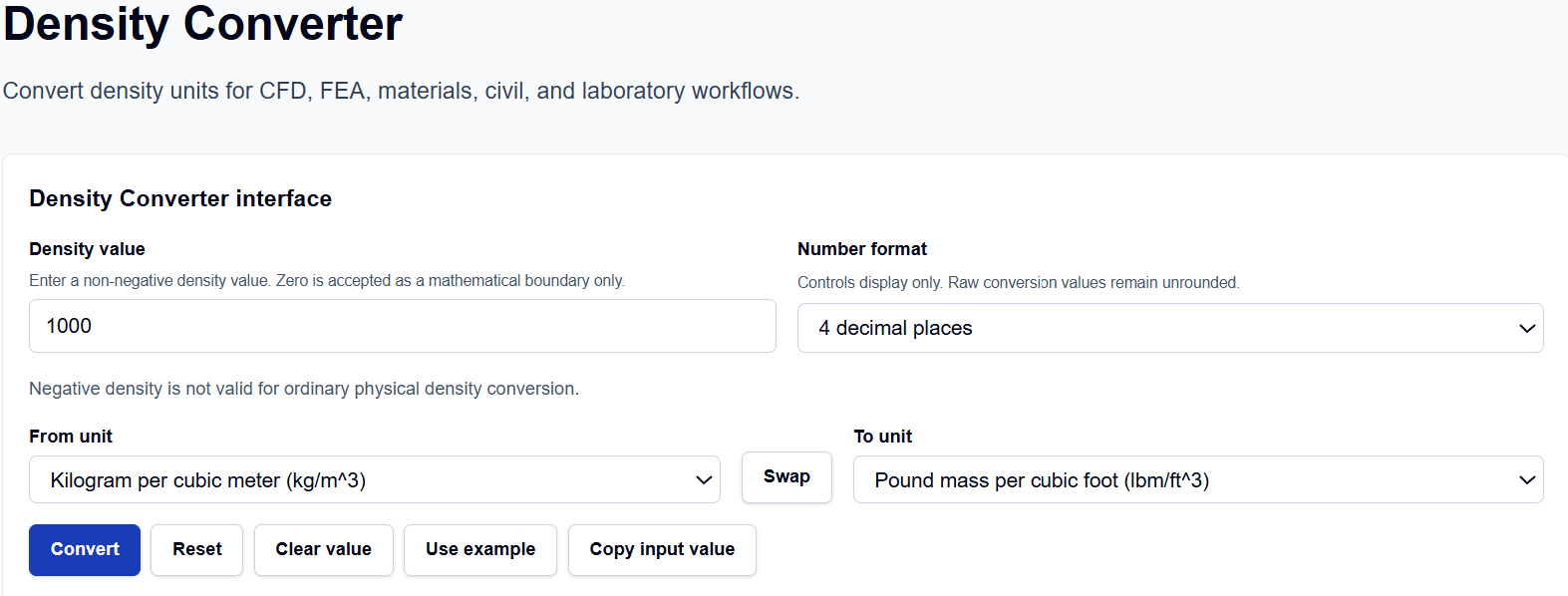
Value and Formatting
I start by entering the Density value. I have noticed that this field is highly flexible; you can enter standard integers or use scientific notation like 1.225e-3 for gas densities at high altitudes. Below this, you can choose the Number format. This controls the display precision only ranging from 2 decimal places up to 8, or up to 6 significant figures—while the tool keeps the raw conversion values unrounded internally to maintain integrity.
Unit Selection
The From unit and To unit dropdowns cover ten standard units, including SI (kg/m³), Metric (g/cm³, g/mL, kg/L), and US Customary (lb/ft³, slug/ft³, lb/US gal). Crucially, the tool enforces a non-negative constraint; negative density is not valid for ordinary physical property conversion.
How I Use the Tool
My typical workflow begins by selecting the source unit from a data sheet. For instance, if I am looking at a material with a density of 1.0 g/cm³, I enter 1 and select that unit as my “From” source.
Once I click the Calculate action, I appreciate the transparency of the Calculation steps. The tool provides an explicit Base-unit normalization, converting the input into kilograms per cubic meter (kg/m³) first before translating to the target unit. This two-step process prevents the compounding rounding errors found in simpler pairwise calculators. After the conversion, I often use the Copy result or Copy full summary buttons to archive the results directly in my project documentation.
Understanding the Results
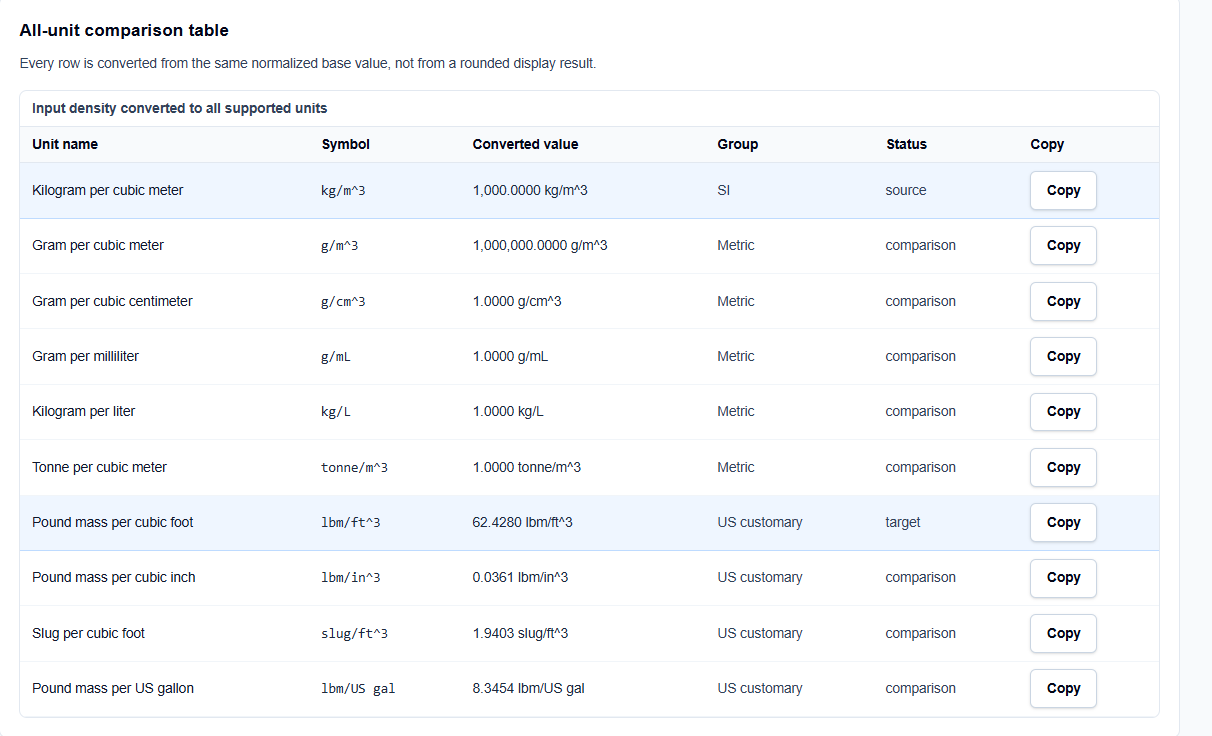
The result section provides the Primary converted value prominently at the top. However, what I find most valuable for auditing my work is the All-unit comparison table generated with every calculation.
Every row in this table is converted from the same normalized base-unit value, not from a rounded display result. If I am converting kg/m³ to lb/ft³, I can glance at the table to simultaneously see the equivalent in slugs/ft³ or kg/L. I also find the Technical visual helpful; it shows a cube diagram labeling mass distributed through volume, providing a visual reminder that $\rho = m/V$.
A Practical Example
Suppose I am verifying the density of water at standard conditions, often taken as 1,000 kg/m³. I enter 1000 in the value field and select Kilogram per cubic meter (kg/m^3) as the source and Pound mass per cubic foot (lbm/ft^3) as the target.
When I click calculate, the tool normalizes the input to 1,000 kg/m³ and returns approximately 62.4280 lb/ft³. I can then look at the comparison table and instantly see that this is also equivalent to 1.0000 g/cm³ or approximately 8.3454 lb/US gal, allowing me to verify my data across different global standards in a single step.
Mistakes I Would Avoid
One common pitfall I see is confusing density with specific gravity. As the tool’s assumptions remind us, specific gravity is a dimensionless ratio and is not included as a density unit. Treating a dimensionless number as a mass-per-volume unit is a common source of calculation failure in hydraulic modeling.
Another mistake is ignoring temperature and pressure effects. Density is not a static constant; it changes with environmental conditions. Always ensure the value you are converting matches the operating conditions of your simulation or laboratory environment.
Try the Free Density Converter
Before you finalize your next property audit or simulation setup, take a minute to verify your mass properties. It is the fastest way to eliminate unit-based errors in your engineering reports.
Try the Density Converter here.
For a complete simulation review, you may also find the Flow Rate Converter, Dynamic Viscosity Converter, Kinematic Viscosity Converter, or the Reynolds Number Calculator essential for your workflow.
FAQ
1. Is specific gravity the same as density?
No. Specific gravity is a dimensionless ratio comparing the density of a substance to a reference (usually water). The ScholarTool Density Converter handles absolute mass-per-volume units only.
2. Why does the tool normalize everything to kg/m³?
By using the kilogram per cubic meter as a common internal base unit, the tool ensures high precision and prevents the compounding rounding errors that occur when converting directly between two non-base units like slug/ft³ and tonnes/m³.
3. Does this tool save my sensitive material data?
No. The Density Converter is “browser-only,” meaning the math happens locally on your computer using TypeScript. Your inputs and results are never uploaded to any ScholarTool server or third-party API.