
Bisection Method Calculator: Online Iteration Table Tool
When I am auditing a numerical simulation or checking a homework assignment, the “stumbling block” is often a non-linear equation that refuses to behave. As noted in Numerical Methods for Engineers, many engineering problems require finding the roots of transcendental equations those containing exponentials, logarithms, or trigonometric functions. While “open” methods like Newton-Raphson are fast, they can diverge if your initial guess is poor.
What I find indispensable for these situations is the Bisection Method Calculator from ScholarTool. It is a deterministic, browser-local utility designed for bracketed root-finding. Its hallmark is reliability; as long as you provide an interval where the function changes sign, the method is guaranteed to converge. Whether I am verifying a hand calculation or performing a preliminary engineering check, this tool provides the transparency I need through a detailed iteration table.
What the Bisection Method Calculator Helps You Do
The primary purpose of this tool is to provide a “slow but sure” path to a root. In technical terms, it applies the Intermediate Value Theorem to systematically halve a bracketed interval until the root is trapped within your chosen tolerance.
I find the interface particularly helpful because it prioritizes instructional clarity. Unlike a black-box solver, this calculator reports the main estimate first, followed by a complete iteration history, residual checks, and a result-driven visual. What I appreciate most is the “browser-only” architecture. Because the tool processes your expressions locally using TypeScript, your proprietary models or research data stay on your machine and are never submitted to a third-party AI or server.
Inputs You Can Use
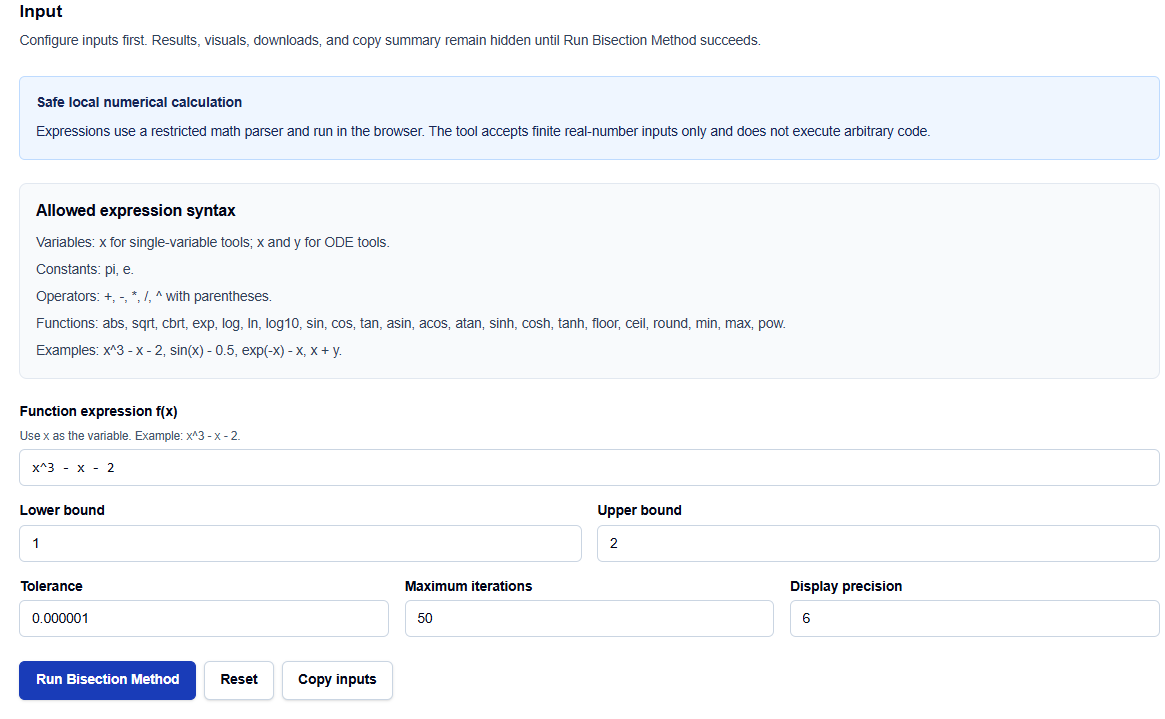
The interface is built with a configuration-first layout that ensures you have a valid setup before results are generated.
Expression Syntax
You can enter a wide range of single-variable functions using the variable x. The tool supports standard operators (+, -, *, /, ^) and a robust library of functions including sqrt, exp, log, and full trigonometry (sin, cos, tan, etc.). For example, I can enter exp(-x) – x to find where those two curves intersect.
Interval and Controls
The core of the method requires a Lower bound and an Upper bound. You also have precise control over:
- Tolerance: The convergence threshold for the residual and bracket width.
- Maximum iterations: A safety limit to prevent unbounded processing.
- Display precision: Controls how many significant digits appear in the final table.
How I Use the Tool
My typical workflow begins with a quick graphical check or a “bounding process” to find where a sign change occurs. Once I have my bounds, I open the calculator.
I enter the expression and set the bounds ensuring that $f(a)$ and $f(b)$ have opposite signs. After configuring the tolerance, I click Run Bisection Method. I find it useful that the results and visuals remain hidden until this explicit action succeeds, which prevents me from acting on stale or default data. I then review the iteration table to see how the interval $b_n – a_n$ is reduced by exactly half in every step.
Understanding the Results
The result section provides a clear Final estimate, but for professional auditing, I focus on the Iteration Table:
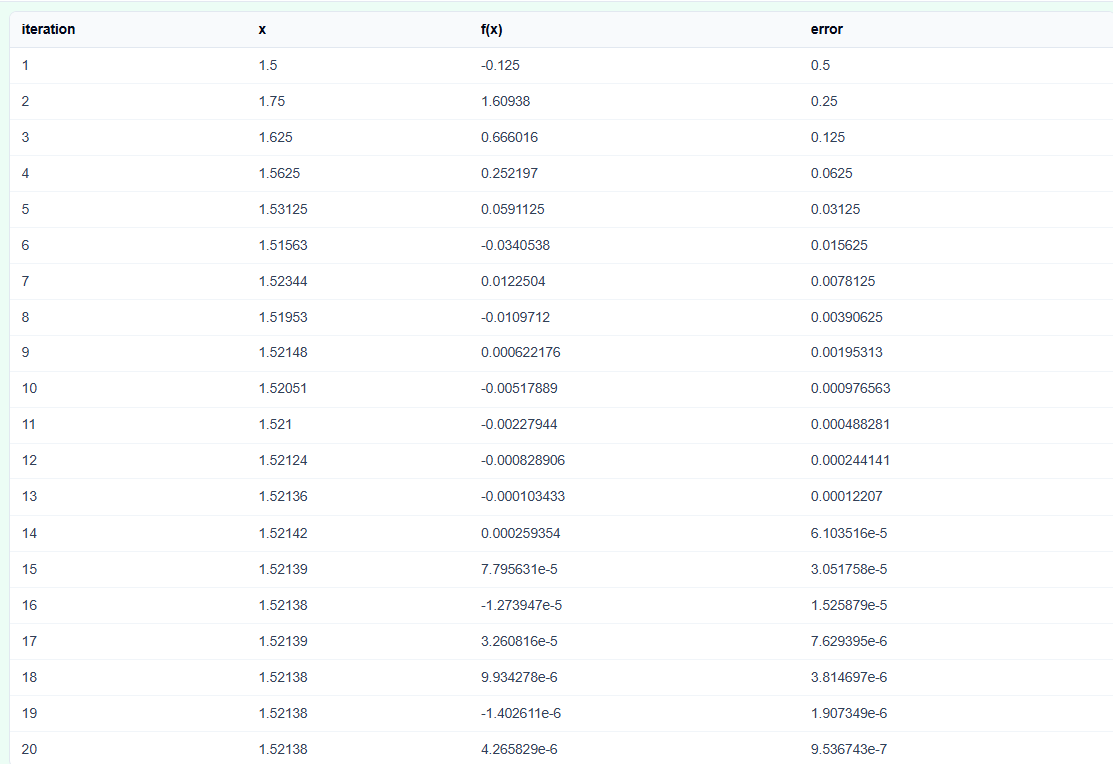
- Residual Checks: I look for the $f(x)$ value approaching zero to verify the quality of the root.
- Interval Width: The table shows the “Bracket Width,” which serves as an exact upper bound on the error.
- Visuals: The tool generates a plot that helps me assess continuity and ensure I haven’t accidentally bracketed a singularity.
A Practical Example: The Trigonometric Benchmark
Suppose I need to find the root for $f(x) = \cos(x) – x$. I enter this into the calculator and set a bracket of $$. In the first iteration, the tool calculates the midpoint at $0.5$ and evaluates the sign change.
As the Bisection Method Calculator runs, I can see the iterates move steadily toward approximately 0.739085. This standard benchmark confirms the tool’s precision and allows me to skip the tedious manual halving of intervals in my notebook.
Mistakes I Would Avoid
One common pitfall is using endpoints without a sign change. If $f(a)$ and $f(b)$ have the same sign, the bisection logic cannot guarantee a root exists in that interval. I always check the function values at the boundaries first.
Another mistake is assuming bisection finds all roots. It is designed to find one root within a specific sign-changing interval. If your function has multiple roots, you must choose your brackets carefully to isolate the specific one you need.
Try the Free Bisection Method Calculator
Before you spend another hour manually iterating through a spreadsheet, take a minute to generate a transparent iteration table. It is the most reliable way to ground your root-finding in verified numerical logic.
Try the Bisection Method Calculator here.
To complete your numerical toolkit, you may also find the Newton-Raphson Calculator or the Secant Method Calculator essential for comparing convergence speeds across different equation types.
FAQ
1. Why must the function have opposite signs at the boundaries?
The sign change [f(a) * f(b) < 0] is the mathematical requirement that ensures at least one root exists between the boundaries, according to the Intermediate Value Theorem for continuous functions./
2. Is the Bisection Method faster than Newton’s Method?
Generally, no. Bisection is “linearly convergent,” meaning it often requires more iterations than the “quadratically convergent” Newton-Raphson method. However, Bisection is much more reliable because it cannot diverge if the sign-change condition is met.
3. Does this calculator send my formulas to a server?
No. All calculations are performed browser-locally using your device’s resources. Your formulas and data are processed in the page state and are never uploaded to a database or AI API.