
Dynamic Viscosity Converter: Pa·s, cP, Poise & US Units
When I am setting up a fluid dynamics simulation or designing a sliding contact bearing, I often hit a wall at the material property stage. A lubricant data sheet might provide dynamic viscosity in Centipoise (cP), but my solver whether it’s OpenFOAM or Ansys requires SI units like Pascal-seconds (Pa·s). Manually shifting decimal points or using generic web snippets for these conversions is a high-risk activity where a single misplaced zero can lead to non-physical results or a total failure of convergence in your model.
What I find indispensable for these checks is the ScholarTool Dynamic Viscosity Converter. It is a deterministic, browser-local utility designed to harmonize fluid resistance units across global standards. It allows me to move between SI, CGS, and US Customary systems with a level of precision and privacy that professional engineering workflows demand.
What is Dynamic Viscosity and Why Convert It?
In technical terms, dynamic viscosity ($\mu$) represents the internal friction of a fluid, specifically relating shear stress to a velocity gradient. As the ScholarTool interface visually demonstrates with its parallel plate model, $\mu$ is the proportionality constant between the force applied to move a surface and the resulting rate of deformation in the fluid layer.
Why is this conversion essential? In industries ranging from oil and gas to aerospace, property standards vary wildly. You might have experimental data in Poise (P) but need to report in Pound-force seconds per square foot (lbf·s/ft²) for a legacy US project. Accuracy is non-negotiable here; as noted in machine design principles, viscosity is the single most important property determining the stability of hydrodynamic bearings and flow regimes.
A Comparative Perspective: Geometry vs. Property
From a comparative perspective, it is useful to see how this tool fits into the broader CFD workflow. While a tool like the Hydraulic Diameter Calculator helps you define the geometric length scale ($D_h$) of your pipe or duct, the Dynamic Viscosity Converter defines the fluid’s inherent resistance to motion.
I find that these two tools often work in tandem. To accurately calculate a Reynolds Number, you must resolve both the geometry (scale) and the viscosity (resistance). Using the Dynamic Viscosity Converter ensures that your fluid properties are as mathematically sound as your CAD dimensions, preventing “garbage-in, garbage-out” scenarios in your simulation inlet conditions.
Inputs You Can Use
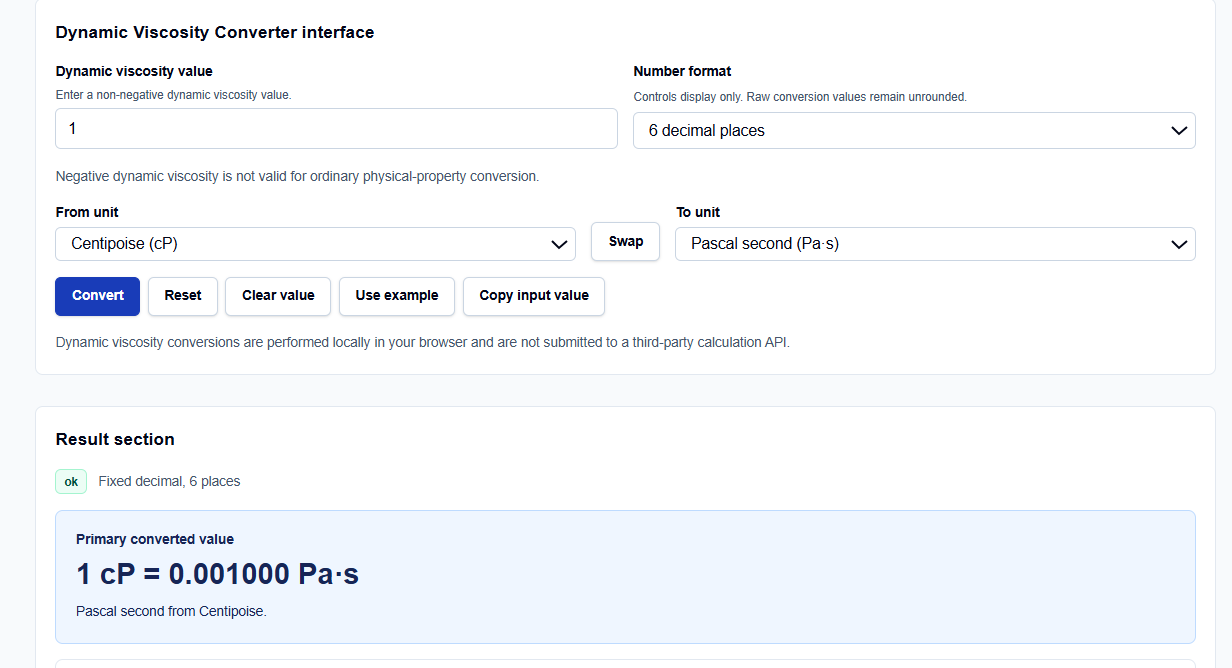
The interface provides a clean, professional layout that allows you to configure your logic before committing to a result.
Value Entry and Sign Validation
I start by entering the Dynamic viscosity value. I have observed that the field supports scientific notation, such as 1e-3, which is helpful when dealing with gases or low-viscosity liquids. Crucially, the tool enforces a non-negative constraint; negative viscosity is not valid for ordinary physical-property conversion.
Formatting and Units
You can control display precision via the Number format menu, choosing between fixed decimal places, significant figures, or scientific notation. The From unit and To unit dropdowns cover the full spectrum of engineering needs, including millipascal-seconds (mPa·s), grams per centimeter second (g/(cm·s)), and pound mass per foot hour (lbm/(ft·h)).
How I Use the Tool
My typical workflow begins with entering the raw data from a material safety data sheet (MSDS). If I see a value like 100 cP, I enter it and select Centipoise as my source.
Once the conversion is triggered, I appreciate that the tool is “browser-only”. Your proprietary fluid parameters are processed locally on your machine and are never submitted to a third-party API a critical security requirement for industrial design. After the calculation, I use the Copy full summary or Copy all-unit table buttons to archive the results directly in my project documentation.
Understanding the Results
The result section provides the Primary converted value prominently at the top. However, what I find most valuable for auditing my work is the Base-unit normalization. The converter uses Pascal-seconds (Pa·s) as its internal base; it normalizes your input to Pa·s before translating it to your target unit.
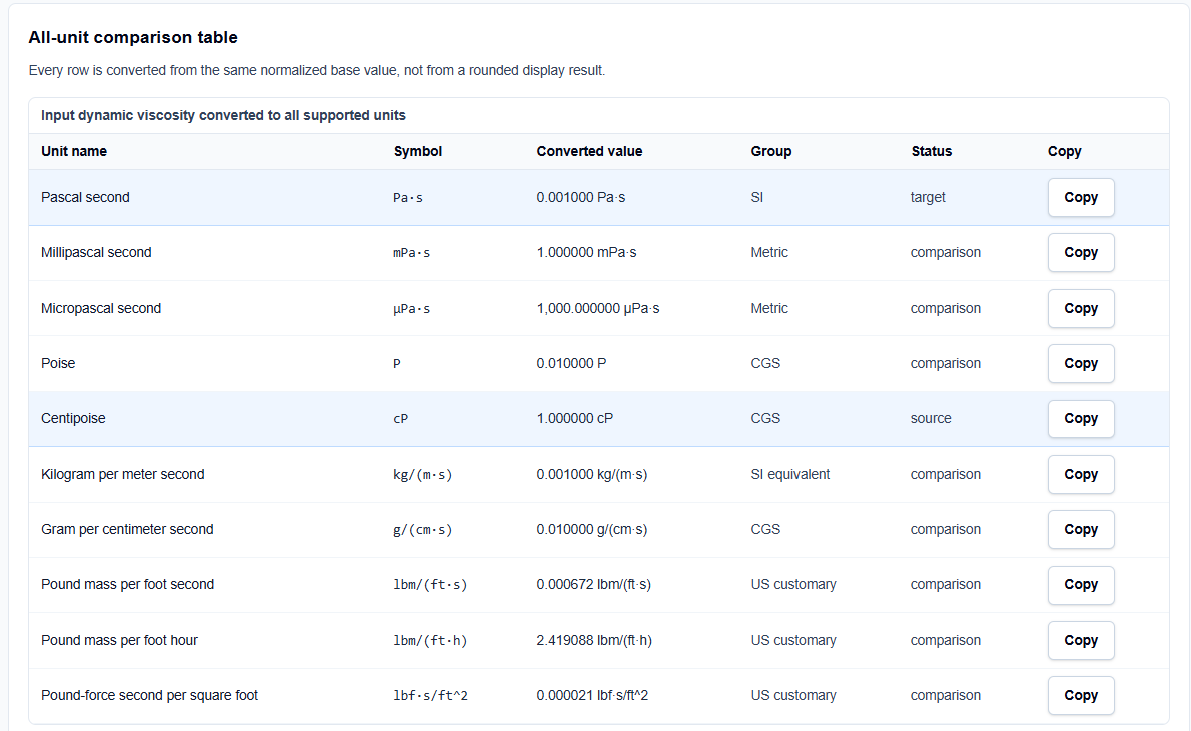
Below this, the All-unit comparison table generates a full matrix of equivalents. If I am converting to SI, I can glance at the table to verify that my Pa·s result matches the kg/(m·s) value exactly, as they are equivalent magnitudes. This multi-system view provides an instant “sanity check” that single-result calculators lack.
A Practical Example
Suppose I am verifying the viscosity of a standard water sample at 20 °C, which is often listed as 1 cP. I enter 1 in the value field and select Centipoise (cP) as the source and Pascal second (Pa·s) as the target.
The result shows that 1 cP = 0.001000 Pa·s. The comparison table then instantly shows me that this is also equivalent to 0.010000 Poise or approximately 0.000021 lbf·s/ft². This allowed me to verify a legacy US Customary setup without having to run a separate calculation.
Mistakes I Would Avoid
One major pitfall is confusing Centipoise (cP) with Centistokes (cSt). Centipoise is a measure of dynamic viscosity, whereas Centistokes is kinematic viscosity. This converter handles dynamic values only; if you need to switch between the two, you must have the fluid density and use a separate kinematic converter.
Another common error is ignoring temperature dependence. Viscosity is not a static constant; it changes significantly with temperature. Always ensure the value you are converting corresponds to the operating temperature of your simulation or machine element.
Try the Free Dynamic Viscosity Converter
Whether you are performing preliminary research or a formal CFD review, this tool provides the precision you need without the risk of manual unit errors.
Try the Dynamic Viscosity Converter here.
To complete your fluid property review, you may also find the Kinematic Viscosity Converter, Density Converter, or the Reynolds Number Calculator essential for your workflow.
FAQ
1. Is 1 Centipoise (cP) exactly equal to 0.001 Pascal-seconds (Pa·s)?
Yes. In the metric system, one Centipoise is exactly one-thousandth of a Pascal-second. You can verify this by checking the base-unit normalization in the converter.
2. Why does the tool require a non-negative value?
Dynamic viscosity is a physical measure of resistance to flow. In standard engineering contexts and ordinary physical-property conversions, a negative viscosity value is not physically valid.
3. Does this tool convert dynamic viscosity to kinematic viscosity?
No. This is a unit converter for dynamic viscosity only. To convert to kinematic viscosity ($\nu = \mu / \rho$), you require the density of the fluid and should use a dedicated kinematic viscosity tool.