
Bearing Life Calculator: L10 Life & Load Rating Tool
When I am auditing a complex machinery assembly or building a Finite Element Analysis (FEA) model, the bearings are often the components that dictate the real-world lifespan of the system. As Dominique Madier notes in FEA Academy’s guidelines, bearings are frequently represented in simulations as simplified stiffness constraints or nodal connections because we are primarily interested in the load transfer to the housing. However, to sign off on a design, I must move beyond the FEA results and determine if the physical bearing can survive the simulated loads.
What I find indispensable for these reliability audits is the Bearing Life Calculator from ScholarTool. It is a deterministic, browser-local utility designed to apply standard ISO 281 formulas to resolve $L_{10}$ life. Whether I am sizing a drive shaft or grounding a maintenance report in physical reality, this tool ensures my rotational life assumptions are mathematically sound while keeping my proprietary project data private.
What the Bearing Life Calculator Helps You Do
The primary purpose of this tool is to identify the basic rating life of a rolling-element bearing. In technical terms, it resolves the power-law relationship between the bearing’s capacity and the applied load ($L_{10} = (C/P)^p$). As the interface shows, the tool identifies the $L_{10}$ life the statistical threshold at which 90 percent of a sufficiently large population of bearings is expected to meet or exceed under defined conditions.
I find this specifically useful because it harmonizes diverse data sources. You can enter dynamic ratings from a manufacturer’s catalog and loads extracted from an FEA nodal probe, and the tool resolves them into Million Revolutions or Life Hours. The calculator removes the risk of manual unit conversion errors by providing a “browser-only” engine. Because the math happens locally on your device, your sensitive manufacturing specs or proprietary load cycles are never submitted to a third-party calculation API.
A Comparative Perspective: Ball vs. Roller Regimes
From a comparative perspective, the tool correctly distinguishes between the internal mechanics of different bearing types. As noted in the input explanations, ball bearings use a life exponent of $p=3$ due to point-contact mechanics, whereas roller bearings use $p=10/3$ to reflect line-contact behavior.
In my experience, seeing how the life estimate shifts between these two modes is a vital “sensitivity check” for early screening. If a ball bearing’s $L_{10}$ life is marginal, I can quickly toggle to the roller mode to see if a geometric upgrade is required, all without leaving the interface.
Inputs You Can Use
The interface is built with a logical, “load-mode” layout that allows you to configure the calculator based on the data you have available.
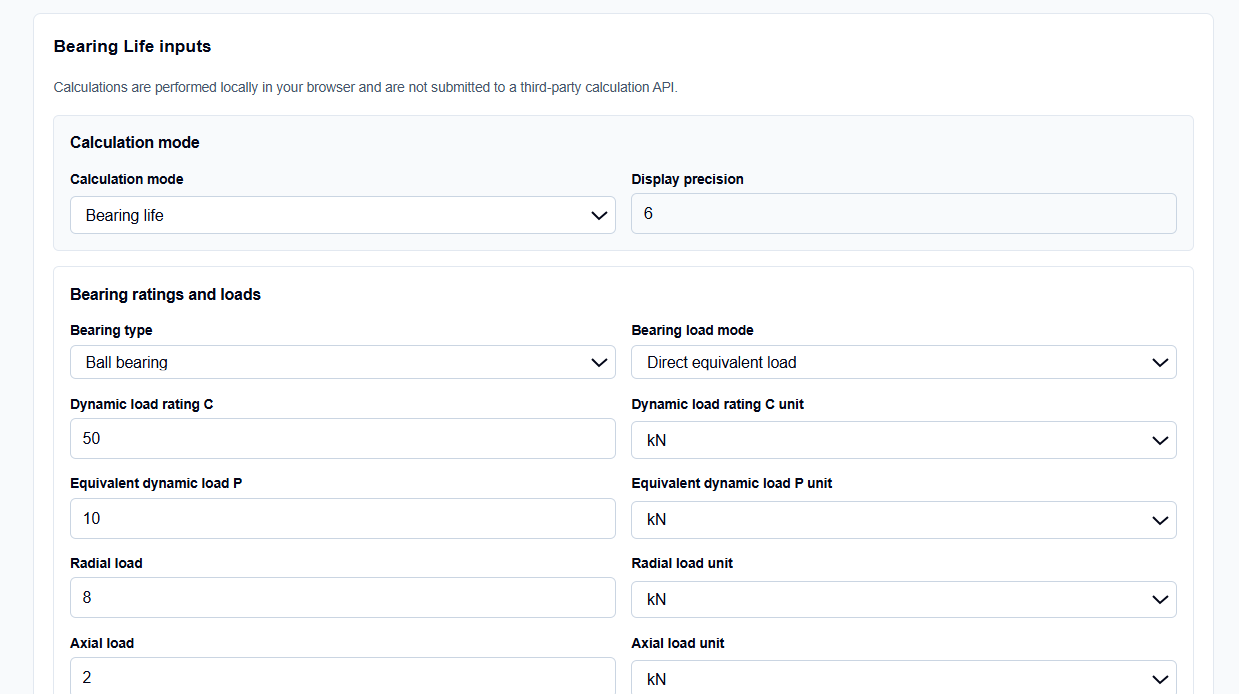
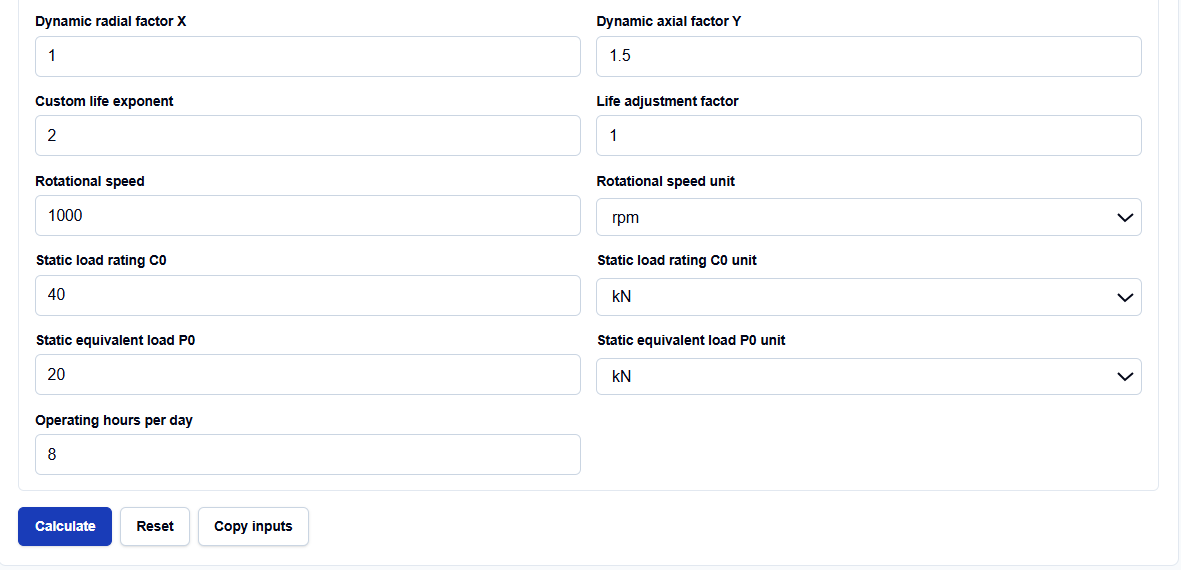
You can choose between ball and roller bearings to automatically apply the correct life exponents.
I start by selecting the Bearing load mode. You can choose “Direct equivalent load” if you have already resolved the vectors, or “Radial and axial loads.” In the latter mode, the tool allows you to enter user-specific $X$ (radial) and $Y$ (axial) factors from a manufacturer’s datasheet to derive the equivalent dynamic load ($P$) internally.
Units and Rotational Speed
The tool stands out because it supports both SI and Imperial units for loads (N, kN, MN, lbf, kip) and rotational speed (rad/s or rpm). What I find particularly helpful for project scheduling is the Operating hours per day input. This allows the tool to translate the theoretical $L_{10}$ hours into “Equivalent operating days,” providing a practical maintenance metric for your report.
How I Use the Tool
My typical workflow begins with extracting the reaction forces from my global Shaft Design Calculator or FEA post-processor. For instance, if I am auditing a steel shaft supported by ball bearings, I select the “Ball bearing” type.
Once I enter the Dynamic load rating ($C$) and the Equivalent dynamic load ($P$), I click Calculate. I appreciate the transparency of the Unit-normalization summary; it acts as a “math receipt” showing exactly what Newton and rpm values were used for the derivation. Because the calculations are performed locally in your browser using TypeScript, I can audit sensitive specifications without fear of data leakage. After the check, I use the Copy summary button to archive the results directly in my design documentation.
Understanding the Results
The result section provides the Basic L10 life prominently at the top in hours. However, for a professional audit, the Secondary results are often more critical for validation:
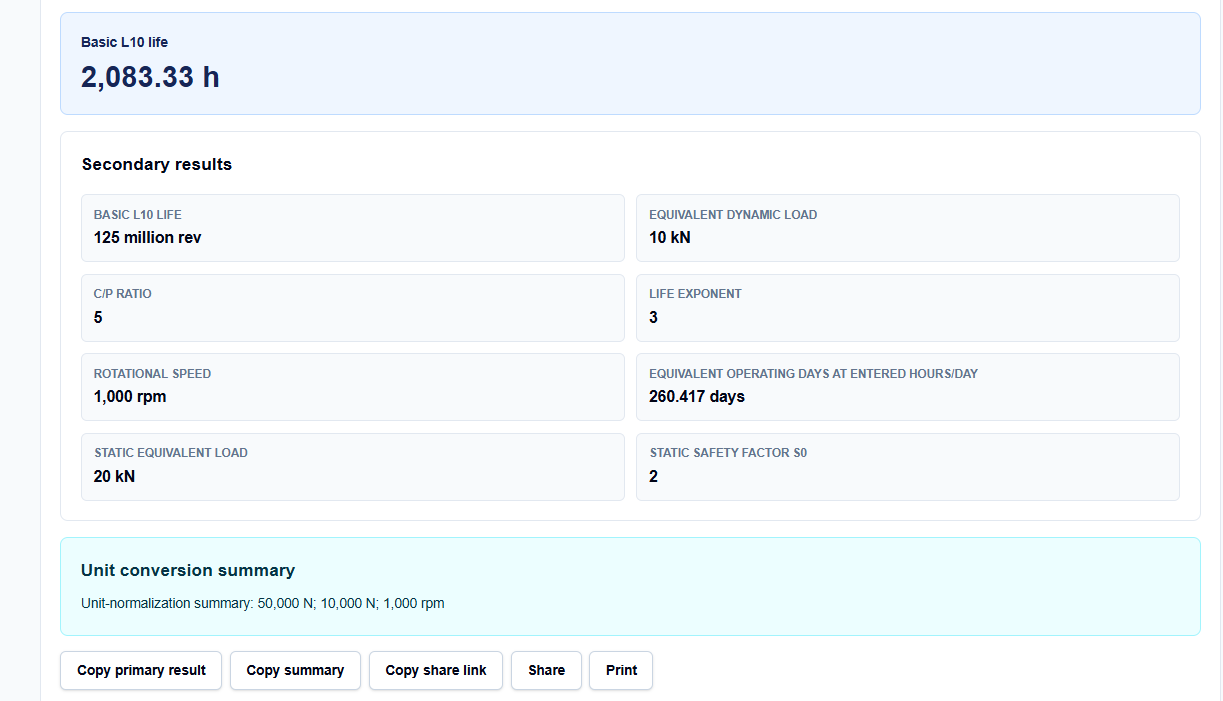
- Basic L10 life (million rev): The fundamental unit used in bearing catalogs.
- C/P ratio: A direct indicator of how heavily the bearing is being utilized.
- Static safety factor ($s_0$): A comparison between the static rating ($C_0$) and static equivalent load ($P_0$) to ensure the bearing doesn’t fail upon initial load.
A Practical Example
Suppose I am verifying a ball bearing with a Dynamic load rating ($C$) of 50 kN subjected to an Equivalent dynamic load ($P$) of 10 kN.
When I enter these values and click calculate, the tool resolves the $C/P$ ratio to 5. Applying the ball exponent ($p=3$), it returns a life of 125 million revolutions. If I have also provided a speed of 1,000 rpm, the tool instantly reports that this corresponds to 2,083.33 hours. This allows me to immediately verify if the bearing meets the 2,000-hour service life requirement of my design specification.
Mistakes I Would Avoid
One common pitfall is treating L10 as a guaranteed life. As the tool’s warnings remind us, actual bearing life can vary widely from the statistical rating. I always use these results for early screening rather than final certification.
Another mistake is ignoring operating environment factors. The ScholarTool interface provides explicit warnings that it does not account for lubrication, contamination, or temperature-based reliability adjustments. I always ensure these results are supplemented with manufacturer-specific adjustment factors if the operating conditions are extreme.
Try the Free Bearing Life Calculator
Before you sign off on your next machine specification or boundary condition setup, take a minute to verify your rotational margins. It is the fastest way to ground your reliability assumptions in physical reality.
Try the Bearing Life Calculator here. To complete your mechanical audit, you may also find the Shaft Design Calculator, Bolt Preload Calculator, or the Factor of Safety Calculator essential for your workflow.
FAQ
1. What is the difference between Ball and Roller exponents?
Ball bearings use an exponent of $p=3$ because the contact between the ball and the race is a point, which results in a specific stress distribution. Roller bearings use $p=10/3$ (approximately 3.33) because the contact is a line, which provides greater load-carrying capacity but a different fatigue progression.
2. Can I calculate life if I only have radial and axial loads?
Yes. You can switch the “Bearing load mode” to “Radial and axial loads.” You will then need to enter the radial and axial factors ($X$ and $Y$) from your bearing’s technical datasheet to resolve the equivalent dynamic load.
3. Is my proprietary project data safe with this tool?
Yes. This calculator is “browser-only,” meaning all mathematics are performed locally on your computer using TypeScript. Your inputs and results are never submitted to a third-party server or calculation API.