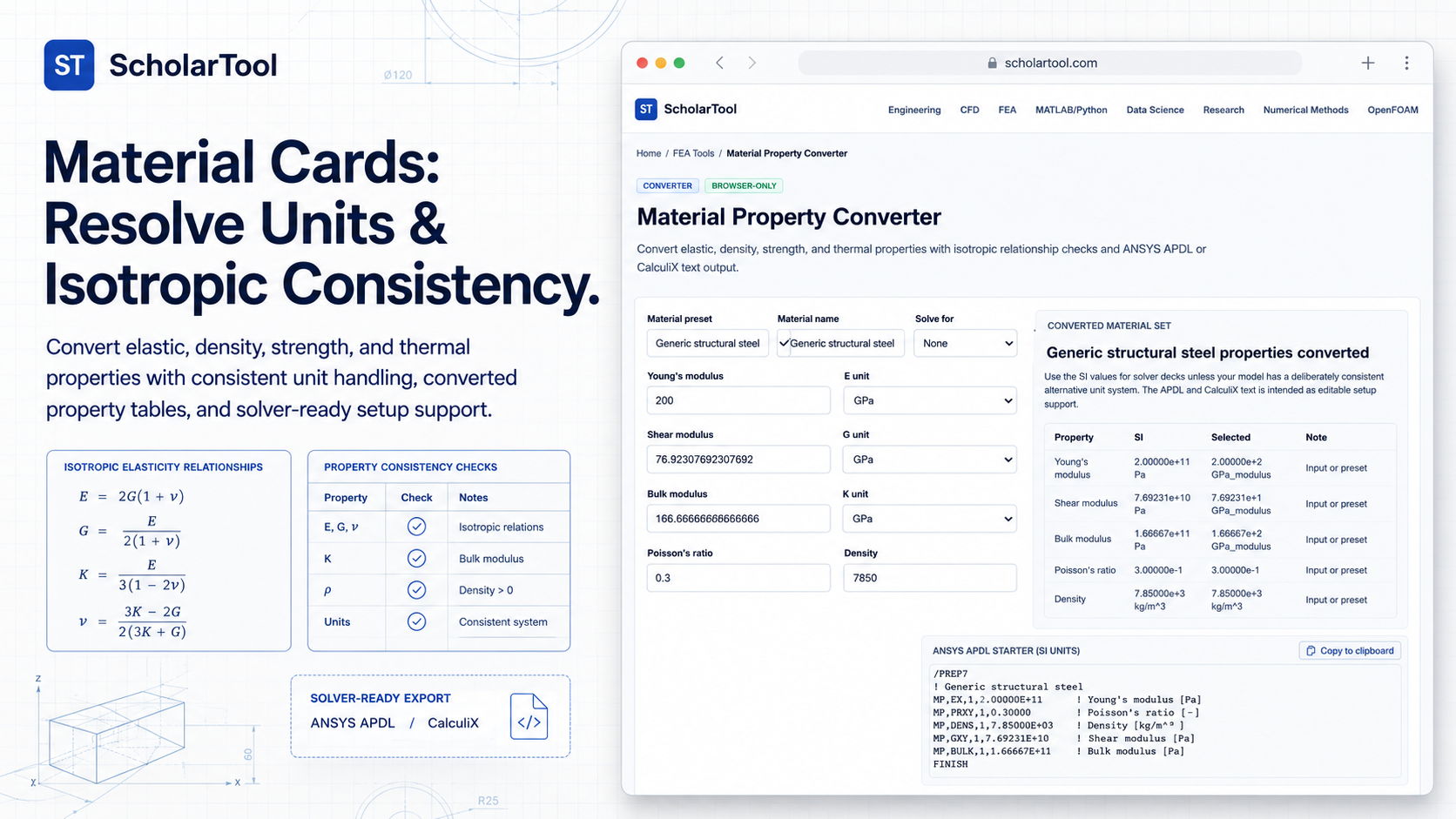
Material Property Converter: FEA Unit & Isotropic Tool
When I am developing a Finite Element Analysis (FEA) model, the most critical “black box” is often the material card. As Dominique Madier emphasizes in the FEA Academy’s guidelines for good modeling practices, properly defining material behavior specifically isotropic behavior for metallic parts is a foundational requirement for simulation validity. In professional engineering reports, documenting mathematical checks and ensuring that your material inputs are internally consistent is not just good practice; it is an audit requirement.
What I find indispensable for these pre-simulation audits is the Material Property Converter from ScholarTool. It is a deterministic, browser-local utility designed to harmonize units across ten core physical properties. Whether I am preparing an ANSYS script or grounding a research report in physical reality, this tool ensures my material assumptions are mathematically sound while keeping my proprietary project data private.
What the Material Property Converter Helps You Do
In technical terms, this tool identifies and resolves the isotropic relationships between elastic constants while performing multi-system unit conversions. The primary purpose of the converter is to bridge the gap between a manufacturer’s datasheet (often in a mix of Imperial and SI units) and the solver-ready “math receipts” required by simulation software.
I find the interface particularly helpful because it provides a “browser-only” calculation engine. Because the math happens locally on your device, your sensitive alloy specifications or proprietary thermal deltas are never submitted to a third-party calculation API. This is a critical security feature when I am working on high-stakes industrial projects that demand total data sovereignty.
Inputs You Can Use
The interface is built with a logical, property-first layout that allows you to configure a complete material definition.
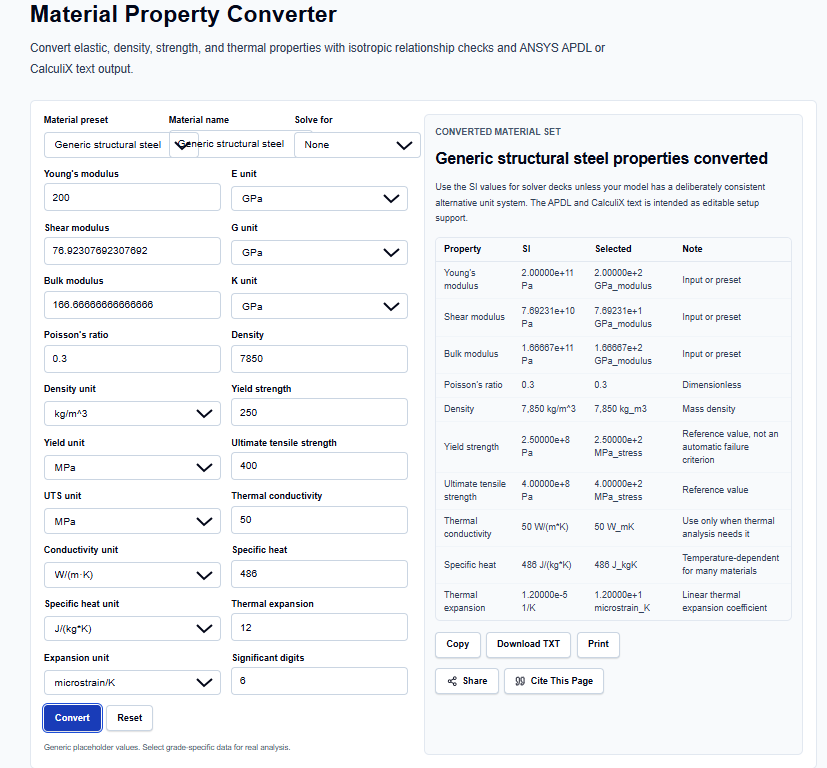
Elastic and Density Properties
I start by entering the fundamental mechanical properties. You can enter Young’s modulus ($E$), Shear modulus ($G$), Bulk modulus ($K$), and Poisson’s ratio ($\nu$). What I find useful is that the tool supports diverse units, such as GPa, MPa, and psi. Below these, you enter the Density ($\rho$). I appreciate that the tool handles the background math of translating density from $lb/in^3$ or $g/cm^3$ into the $kg/m^3$ format required by most solvers.
Strength and Thermal Data
For advanced analysis, you can include Yield strength, Ultimate tensile strength, Thermal conductivity, Specific heat, and the Linear thermal expansion coefficient ($\alpha$). The tool supports microstrain/K for expansion, which I find much more intuitive than the standard $1/K$ scientific notation often found in textbooks.
How I Use the Tool
My typical workflow begins with the material datasheet. For instance, if I am defining a generic structural steel, I select the units that match my source data.
Once I enter the values, the tool performs Normalization. What I find professionally vital is the Isotropic relationship check. If I enter $E = 200$ GPa and $\nu = 0.3$, the tool applies the formula $G = E / [2(1 + \nu)]$ to resolve the shear modulus as approximately 76.9 GPa. This immediate feedback allows me to verify that my material card is internally consistent before I hit “Solve” in my FEA software. After the check, I scroll down to the ANSYS APDL or CalculiX sections to grab the generated starter text, which I can then paste directly into my input files as an editable snippet.
Understanding the Results
The result section provides a Converted material property table that shows the property in its “Selected” unit and its “SI” equivalent side-by-side. For professional validation, I pay close attention to:
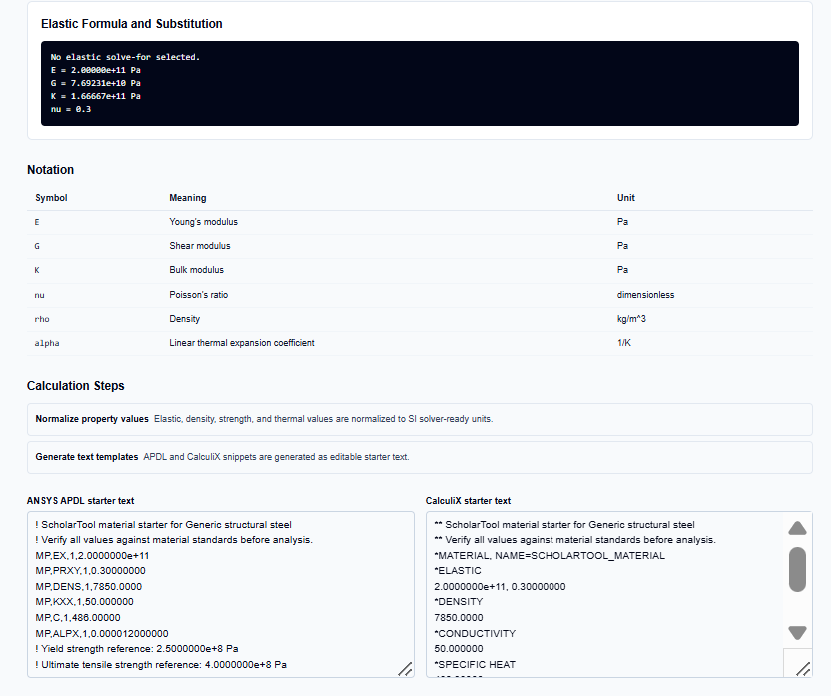
- Unit-normalization summary: Acts as a “math receipt” showing the solver-ready values.
- Formula notation: Explicitly defines the symbols ($E, G, K, \nu$) so there is no ambiguity in my documentation.
- Solver Snippets: Provides the specific commands (like MP,EX for ANSYS) needed to initialize the material model.
A Practical Example
Suppose I am verifying a material model for a high-stiffness component. I enter a Young’s modulus of 200 GPa and a Poisson’s ratio of 0.3.
When I review the output table, the tool returns a Shear modulus of 7.69231e+10 Pa (76.9 GPa) and a Bulk modulus of 1.66667e+11 Pa. If I were to change the Poisson’s ratio toward 0.5, I would see the Bulk modulus approach infinity a professional reminder from the tool that near-incompressible behavior requires careful element and solver choices to avoid volumetric locking.
Mistakes I Would Avoid
One common pitfall is treating solver snippets as final production code. As the tool’s FAQs warn, you should use the generated text as starter text only. I always verify the unit system and solver syntax against the specific analysis type before production use.
Another mistake is ignoring thermal expansion units. Switching between $1/K$ and $1/^\circ C$ or microstrain can lead to massive errors in thermal stress results. I always use the converter’s Unit conversion summary to ensure my $\alpha$ value has been normalized correctly to the SI base.
Try the Free Material Property Converter
Before you initialize your next simulation or sign off on a material specification, take a minute to verify your unit consistency. It is the fastest way to ensure your FEA material cards are grounded in physical and mathematical reality.
Try the Material Property Converter here.
To complete your structural audit, you may also find the Mohr’s Circle Calculator, Principal Stress Calculator, or Shaft Design Calculator essential for your workflow.
FAQ
1. How does the tool check “Isotropic Relationship”?
In an isotropic material, only two elastic constants are independent. The tool uses the relationship $G = E / [2(1 + \nu)]$ to ensure that your values for Young’s modulus, Shear modulus, and Poisson’s ratio are physically compatible.
2. Can I use the generated text directly in my simulation?
The tool provides “starter text” that must be verified against your specific material standards and solver version before production use. You should always confirm the unit system matches your global model.
3. Does this tool support OpenFOAM material dictionaries?
No. As the documentation states, structural FEA properties do not automatically map to OpenFOAM case dictionaries, so broad OpenFOAM output is not currently generated.