
Literature Review Matrix Builder: Online Synthesis Tool
When I begin a new research project whether it is a systematic literature review (SLR) on CFD mesh sensitivity or a background chapter for a nursing dissertation the “first hurdle” is rarely finding the sources. Instead, it is the daunting task of organizing the “unstructured pile” of findings into a coherent scholarly conversation. As noted in Practical Research, measurement and organization are the foundations of the research process, yet raw study notes remain meaningless until you identify the patterns that lie beneath them.
I find that the gap between reading an article and writing a synthesis is often filled with manual spreadsheet errors. That is why I use the Literature Review Matrix Builder from ScholarTool. It is a deterministic, browser-local research utility designed to convert your structured study notes into a transparent “math receipt” featuring a synthesis matrix, theme counts, and research gap summaries. It prioritizes data residency, ensuring your proprietary research variables never leave your machine.
What the Literature Review Matrix Builder Helps You Do
The primary purpose of this tool is to help you move from isolated summaries to a thematic integration of evidence. In technical terms, it performs a structured parse of your notes to report frequencies of themes and identify gaps in the current state of knowledge.
What I find useful here is the focus on “ownership of the literature”. Unlike standard AI tools that might summarize data for you in a “black box” manner, this builder requires you to define the relationships. It uses deterministic browser-side rules to split your rows into a synthesis table, identifying citations, methods, and findings. This ensures that your final manuscript is grounded in your own critical evaluation rather than a hallucinated algorithm.
Inputs You Can Use
The interface is built with a configuration-first layout that ensures your notes are structured correctly before any matrix is generated.
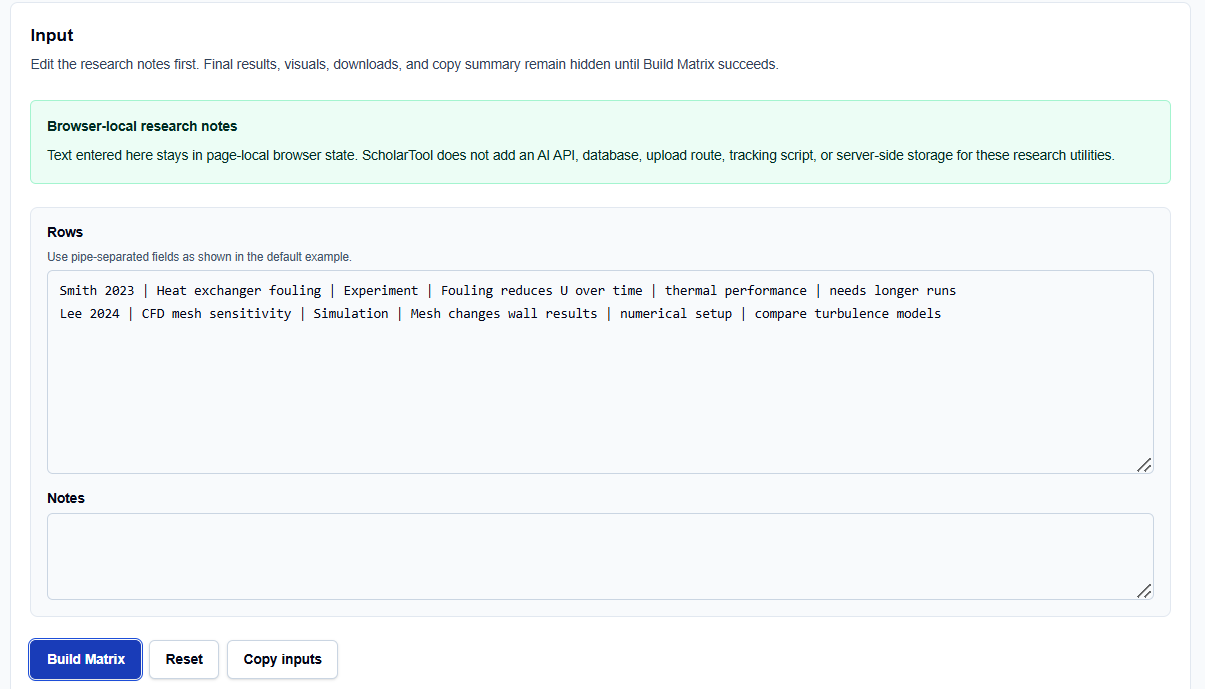
Structured Study Rows
In the Study rows field, you enter your data using pipe-separated fields. I typically use the format: Citation | Aim | Method | Finding | Theme | Gap. For example, if I am reviewing a paper on heat exchangers, I might enter: Smith 2023 | Fouling impact | Experiment | Fouling reduces U | thermal performance | needs longer runs.
Free-Text Notes and Metadata
Below the rows, you can include Notes regarding your overarching methodology or synthesis criteria. What I find indispensable is that all this text stays in the page-local browser state; ScholarTool does not add an AI API or server-side storage for these utilities.
How I Use the Tool
My typical workflow starts during the proposal stage of a project. I open the Literature Review Matrix Builder.
I replace the default example rows with my own project-specific notes. Once I have categorized my studies by their primary themes, I click Build Matrix. I find it practical that the result section, visuals, and downloads remain hidden until this action succeeds, preventing me from acting on stale data. If I change a single input row later, the tool automatically hides the old result, requiring a rerun a vital professional safeguard to ensure the output always matches the current input.
Understanding the Results
The result section provides a Review Matrix first, identifying the juxtapositions between multiple sources. For a professional audit, I focus on:
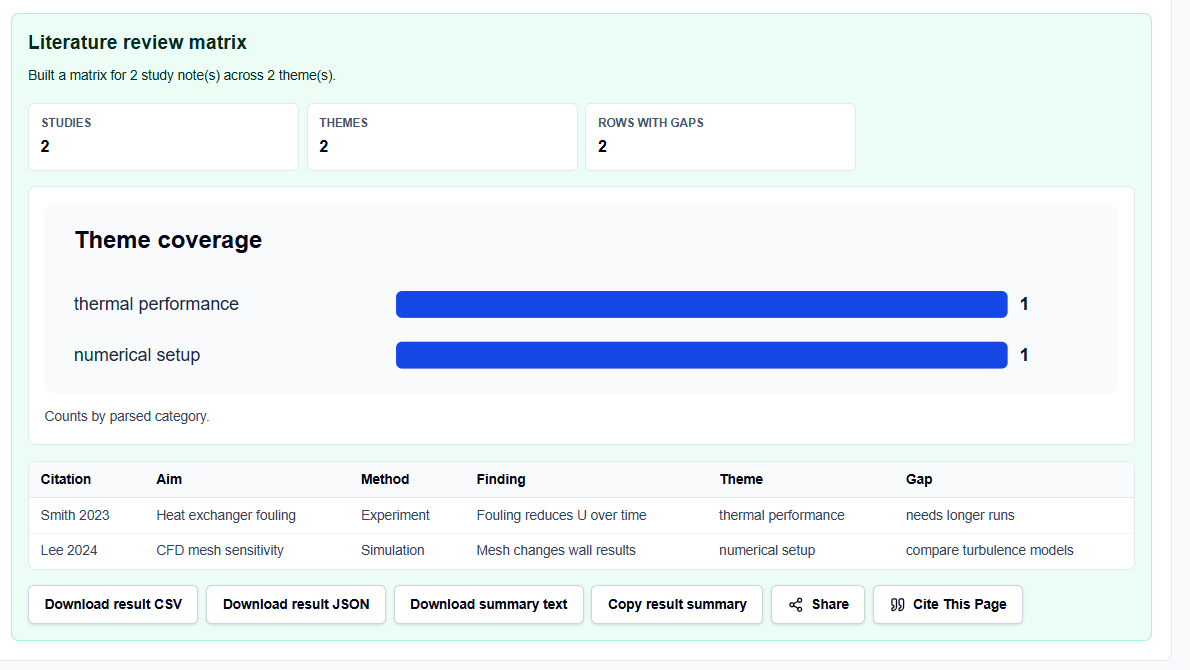
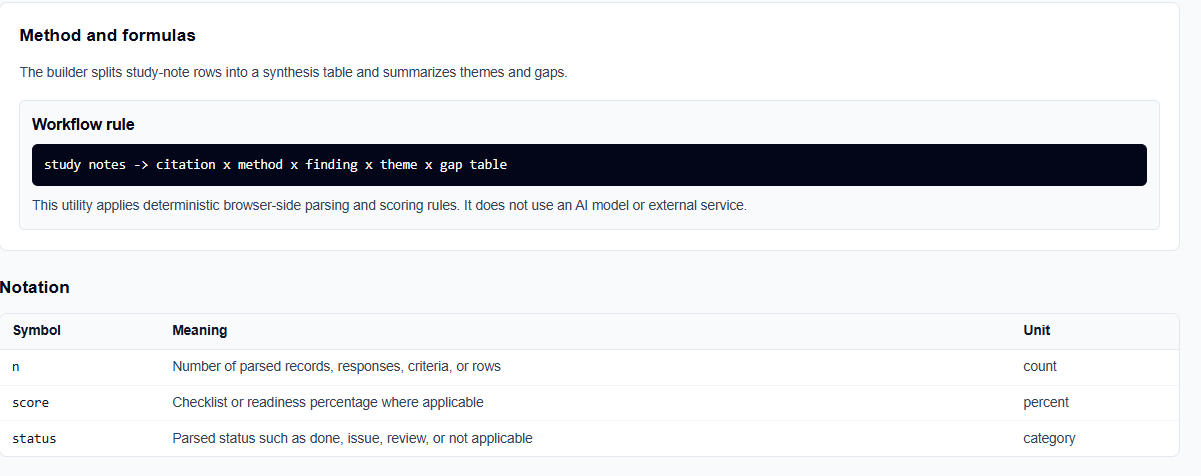
- n (Number of parsed records): This helps me verify that every row I entered was processed correctly.
- Theme and Gap Summaries: The tool counts how often specific themes appear, which is essential for determining which sections of my narrative review require more evidence.
- Readiness Score: While the tool provides a “score” percentage, I follow its guidance: treat it as a progress metric for my checklist, not as final academic approval.
A Comparative Perspective: Manual Tables vs. Matrix Builders
From a professional perspective, you have several ways to organize literature:
- Manual Spreadsheets (Excel): Highly customizable but prone to formatting errors and difficult to use for narrative synthesis.
- Standard Index Cards: The traditional method, but unfeasible for the exponential growth of modern scientific knowledge.
- The Literature Review Matrix Builder: Best for the “pre-writing” phase. It provides a “math receipt” for your synthesis, allowing you to export a structured artifact that can be shared with a supervisor or librarian for review.
A Practical Example: The CFD Setup
Suppose I enter two rows regarding simulation research:
- Lee 2024 | CFD mesh | Simulation | Mesh changes results | numerical setup | compare models
- Chen 2024 | Turbulence | Simulation | k-omega is stable | numerical setup | test higher Re.
After clicking the action button, the tool identifies “numerical setup” as a common theme ($n=2$) and lists the comparison of models and higher Reynolds numbers as gaps. Seeing this “math receipt” allows me to structure the “I SAY” portion of my review with evidence-based authority.
Mistakes I Would Avoid
One common pitfall is using a workflow score as proof of completion. As the tool’s practical guidance suggests, a high score means fewer gaps in your matrix, not that your manuscript is ready for submission.
Another mistake is leaving example rows in place. Always ensure your inputs are project-specific to avoid generating misleading summaries.
Try the Free Literature Review Matrix Builder
Before you manually shuffle through pages of notes to find a connection, take a minute to generate a transparent synthesis draft. It is the fastest way to ground your research planning in structured logic while maintaining total browser privacy.
Try the Literature Review Matrix Builder here.
To complete your research workflow, you may also find the SLR Search String Builder or the Thesis Chapter Planner essential for your academic success.
FAQ
1. Does this tool automatically find research papers for me?
No. This tool is a synthesis builder for your existing notes. You should search for relevant scholarly sources using library databases or Google Scholar first, then enter your findings into the tool to organize them.
2. Is my proprietary research text sent to a database?
No. The builder runs entirely in your browser using page-local state. ScholarTool does not add an AI service or server-side storage for your research notes, ensuring total data residency.
3. Why do the results disappear when I edit a row?
The tool is designed to prevent “stale” or misleading artifacts. If you change your inputs, the old matrix is hidden until you click “Build Matrix” again, ensuring your exported files always match your current notes.