
Darcy Friction Factor Calculator: Colebrook & Haaland Tool
When I am calculating the head loss in a complex industrial piping system or setting up a surface roughness boundary condition for a CFD simulation, the friction factor is the single most critical variable. As noted in standard fluid mechanics texts, the relationship between flow velocity and pressure drop is governed by the Darcy-Weisbach equation. However, the most accurate way to find that friction factor—the Colebrook-White equation—is implicitly defined. This means you cannot simply solve for it; you must iterate until the equation converges.
What I find indispensable for these workflows is the ScholarTool Friction Factor Calculator. It is a deterministic, browser-local utility designed to solve the implicit Colebrook equation and compare it against common explicit approximations like Haaland and Swamee-Jain. Whether you are performing a preliminary pipe-network audit or grounding your OpenFOAM model in physical reality, this tool ensures your dimensionless coefficients are mathematically sound.
What the Friction Factor Calculator Helps You Do
The primary purpose of this tool is to identify the Darcy friction factor ($f_D$) for pipe-flow pressure-loss estimates. In technical terms, the friction factor represents the resistance offered by the pipe wall to the fluid flow. As the ScholarTool interface demonstrates, this resistance depends heavily on the Reynolds number ($Re$) and the relative roughness of the pipe.
I find this tool particularly useful for its “Comparative Perspective.” In many engineering reports, using a simple explicit formula like Haaland is acceptable, but for critical safety systems, you need the rigorous iterative solution. The interface allows me to “Compare all methods,” showing the slight variances between the iterative Colebrook result and the explicit approximations. This level of transparency is vital when you are justifying a specific pressure drop in a design review.
Inputs You Can Use
The interface provides a professional layout that allows you to choose your level of data integration.
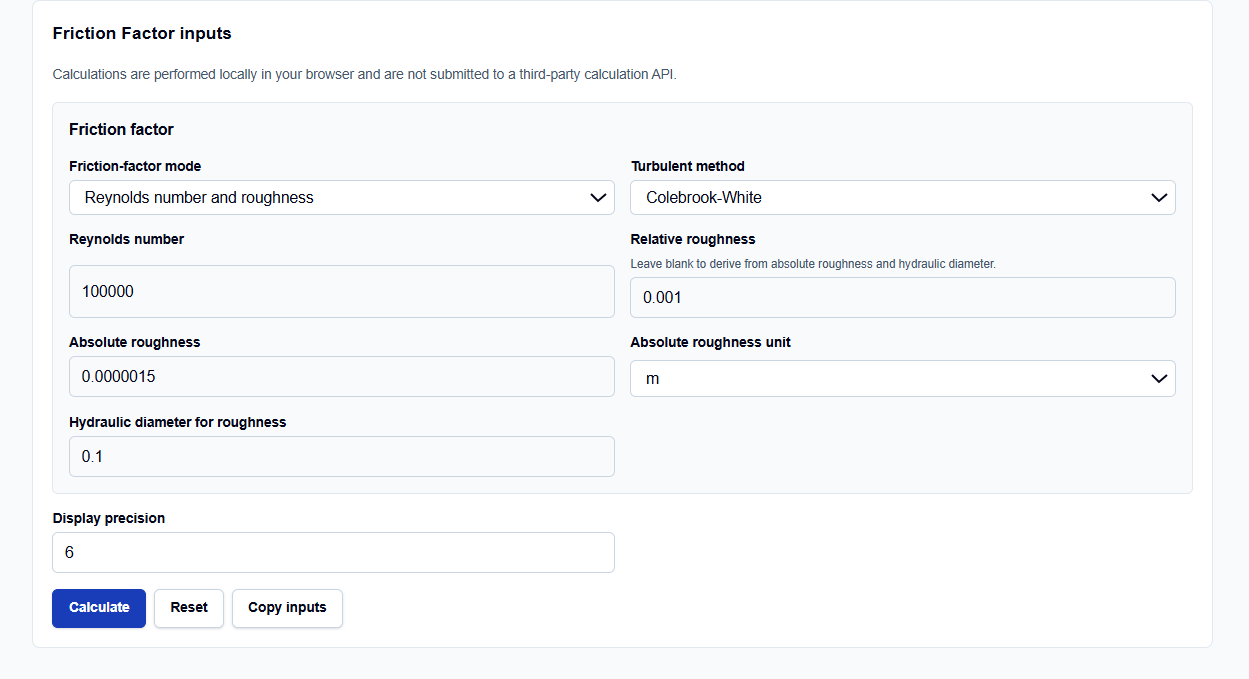
Friction-Factor Modes
I typically use the “Reynolds number and roughness” mode if I already have my dimensionless flow context. However, if you are starting from raw data, you can choose to “Calculate from fluid, flow, geometry, and roughness.” In this mode, the tool leverages hydraulic diameter and velocity inputs to derive the Reynolds number internally.
Geometry and Roughness
You can enter Relative roughness ($\epsilon/D_h$) directly, or enter the Absolute roughness ($\epsilon$) and the Hydraulic diameter ($D_h$) separately. What I appreciate is the support for six different units for absolute roughness—ranging from microns (µm) for smooth drawn tubing to feet (ft) for large civil culverts.
How I Use the Tool
My typical workflow begins by selecting the Turbulent method. If I need the most accurate value, I select “Colebrook-White.” If I am performing a quick sensitivity check, I might use “Haaland” or “Swamee-Jain”.
Once I enter my Reynolds number (e.g., 100,000) and roughness values, I click Calculate. I appreciate that the tool is “browser-only,” meaning the TypeScript logic executes locally on my machine. This ensures that my proprietary project parameters—like specific industrial roughness specs—are never submitted to an external server. After reviewing the result, I use the “Copy primary result” or “Copy summary” buttons to archive the data directly into my CFD setup log.
Understanding the Results
The result section provides the Darcy friction factor ($f_D$) as the primary output. For those of us working with legacy or specialized software, the tool also provides the Fanning friction factor ($f_F$) as a secondary result. As Bruce Hunt’s research reminds us, these are often confused, yet they differ by a factor of four ($f_F = f_D / 4$).
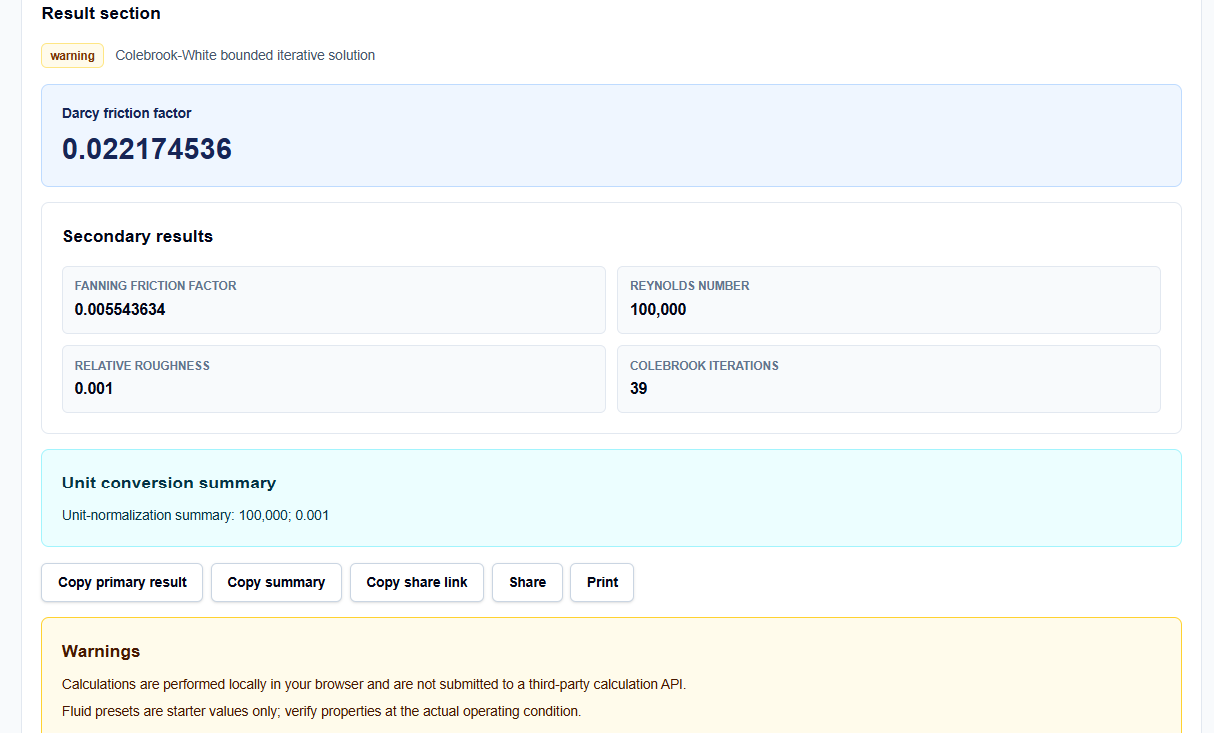
One feature I find professionally vital is the Colebrook iterations count. Seeing that the solver reached a solution in 39 steps gives me confidence in the convergence of the iterative process. The Method comparison table then allows me to see the deviation between the iterative result and explicit methods, which is often less than 1% for Swamee-Jain.
A Practical Example
Suppose I am verifying the flow in a 0.1 m diameter pipe with a Reynolds number of 100,000 and an absolute roughness of 0.00015 m.
The calculator resolves the relative roughness as 0.0015. Using the Colebrook-White iterative solution, it returns a Darcy friction factor ($f_D$) of approximately 0.02217. I can then look at the Fanning factor secondary result (0.00554) to ensure I am using the correct input for my specific simulation solver.
Mistakes I Would Avoid
One common pitfall is confusing Darcy and Fanning factors. Using the wrong factor will result in a 400% error in your pressure loss calculations. I always check the secondary result labels in the calculator to verify which “f” my formula requires.
Another mistake is using turbulent correlations in the laminar or transitional zones. As noted in the tool’s warnings and the literature, the Colebrook equation is for turbulent flow. For $Re < 2000$, the flow is laminar, and the friction factor follows the simpler $f = 64/Re$ relationship. The ScholarTool interface provides warnings if your input falls into these uncertain regimes.
Try the Free Friction Factor Calculator
Before you finalize your next head loss calculation or CFD boundary condition, take a moment to resolve your friction factors with precision.
Try the Friction Factor Calculator here. To complete your fluid analysis, you may also find the Reynolds Number Calculator, Pressure Drop Calculator, or the Y Plus Calculator essential for your workflow.
FAQ
1. What is the difference between Darcy and Fanning friction factors?
The Darcy friction factor ($f_D$) is typically used in the Darcy-Weisbach equation for head loss, while the Fanning friction factor ($f_F$) is often used in chemical engineering and heat transfer. Numerically, $f_D = 4 \times f_F$. The calculator provides both to prevent confusion.
2. Why is the Colebrook equation iterative?
Because the friction factor variable ($f_D$) appears on both sides of the equation and is inside a square root and a logarithm, it cannot be isolated algebraically. The calculator uses a bounded numerical solver to find the converged value.
3. When should I use Swamee-Jain instead of Colebrook?
Swamee-Jain is an explicit approximation that does not require iteration. It is useful for quick hand calculations and is generally accurate within 1% of Colebrook. Use the tool’s “Compare all methods” mode to see if the approximation is acceptable for your Reynolds number.