
Flow Rate Converter: m3/s, L/min, US & Imperial GPM
When I am reviewing a technical specification for a new industrial pump or setting up a boundary condition for a Computational Fluid Dynamics (CFD) simulation, I often encounter a “volumetric mismatch” that can derail a project. One supplier might list a lubricant’s requirement in Liters per minute ($L/min$), while my legacy simulation software expects Cubic feet per minute (CFM), and a US-based manufacturer provides data in Gallons per minute (GPM). Manually performing these conversions on a handheld calculator is an invitation for a decimal-point error a mistake that, as noted in machine design manuals like Bhandari’s, can compromise the stability of hydrodynamic bearings if the cooling flow is miscalculated.
What I find indispensable for these checks is the ScholarTool Flow Rate Converter. It is a deterministic, browser-local utility designed to translate volumetric magnitudes across SI, Metric, US Customary, and Imperial systems. Whether I am defining a boundary condition for an OpenFOAM run or auditing laboratory flow meters, this tool ensures that my property assumptions are accurate and my proprietary data remains private.
What the Flow Rate Converter Helps You Do
In technical terms, volumetric flow rate ($Q$) is the volume of fluid passing through a specific cross-section per unit of time. The primary purpose of this converter is to provide a unified environment where diverse units ranging from Cubic meters per second ($m^3/s$) used in heavy civil engineering to Milliliters per second ($mL/s$) found in precision medical or laboratory workflows can be harmonized.
As I have observed in fluid mechanics context, accuracy in these translations is a fundamental safety and performance requirement. An error in converting US GPM to Imperial GPM a common pitfall because the gallon sizes differ could lead to a pump being undersized for its application. The ScholarTool interface eliminates this risk by clearly separating these two standards and using a “browser-only” calculation engine. Because the math happens locally on your device, your sensitive manufacturing specs or research data are never submitted to a third-party calculation API.
A Comparative Perspective: Volumetric vs. Mass Flow
From a comparative perspective, it is critical to distinguish what this tool does from what it does not do. As the tool’s own Engineering interpretation reminds us, volumetric flow is strictly about volume and time.
If you are trying to calculate the mass of fluid moving through a system, you would need to use a Density Converter alongside this tool, as mass flow requires density. Similarly, if you need the velocity of the fluid, you must know the pipe’s cross-sectional area. I find this distinction helpful because it prevents the common mistake of treating $Q$ as a direct proxy for speed or mass without accounting for the physical dimensions or properties of the fluid.
Inputs You Can Use
The interface is built with a logical, “config-first” layout that allows you to set your parameters before you trigger a result.
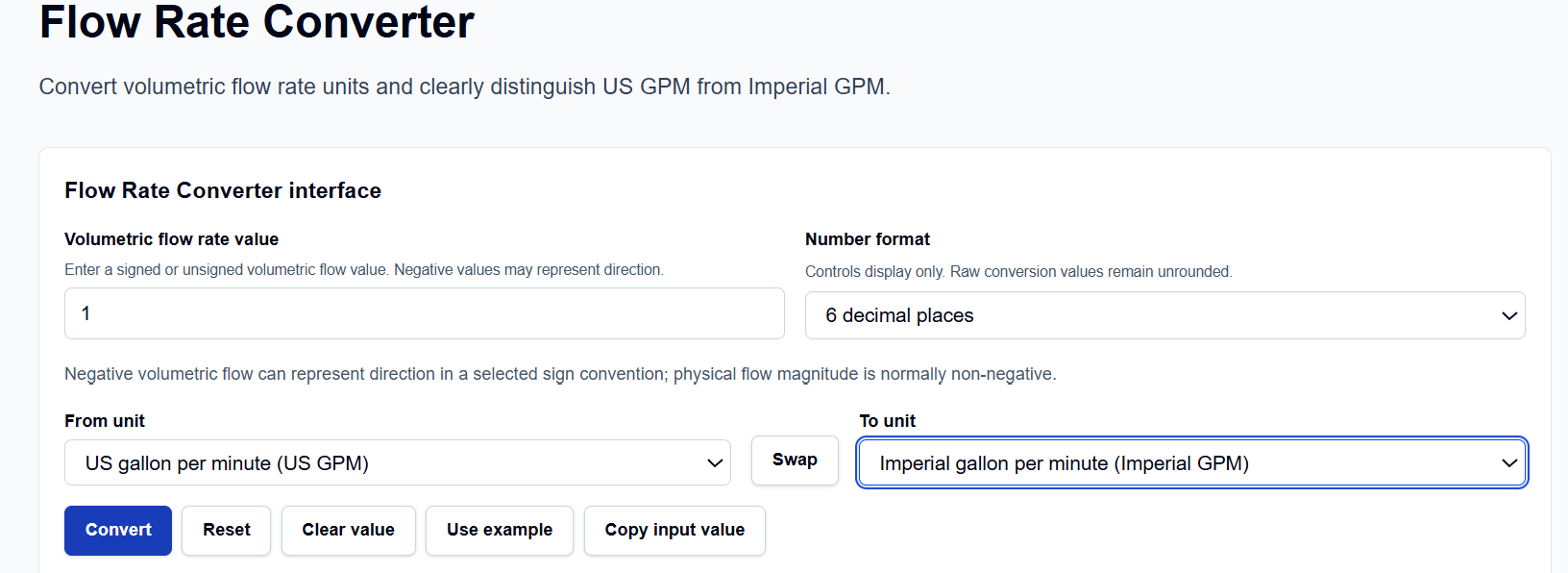
Value and Directionality
I start by entering the Volumetric flow rate value. I have noticed that this field is highly flexible; you can enter standard decimals or use scientific notation like 1e3 for high-volume applications. A standout feature here is that it supports signed values. In many simulation conventions, a negative flow value represents direction (e.g., flow out of a domain), and the tool preserves this sign during translation.
Formatting and Units
Below the input, you can choose the Number format. This controls the display precision only—ranging from 2 to 8 decimal places or up to 6 significant figures—while the tool keeps the raw conversion values unrounded internally to maintain mathematical integrity. The From unit and To unit dropdowns cover 15 standard units, including SI ($m^3/s$), Metric ($L/h$, $cm^3/s$), and the critical distinction between US GPM and Imperial GPM.
How I Use the Tool
My typical workflow begins by selecting the source unit from a manufacturer’s catalogue. For instance, if I am looking at a motor-driven fan rated in CFM, I select “Cubic foot per minute (ft^3/min)” as my “From” unit. If I accidentally enter them in the reverse order, I simply click the Swap button to reverse the logic instantly.
Once I click the Convert action, I appreciate the transparency of the Calculation steps section. The tool provides an explicit Base-unit normalization, converting your input into Cubic meters per second ($m^3/s$) first before translating to the target unit. This two-step process prevents the compounding rounding errors found in simpler calculators. After the conversion, I use the Copy result or Print summary buttons to archive the data directly in my project documentation.
Understanding the Results
The result section provides the Primary converted value prominently at the top. However, what I find most valuable for auditing my work is the All-unit comparison table generated with every calculation.
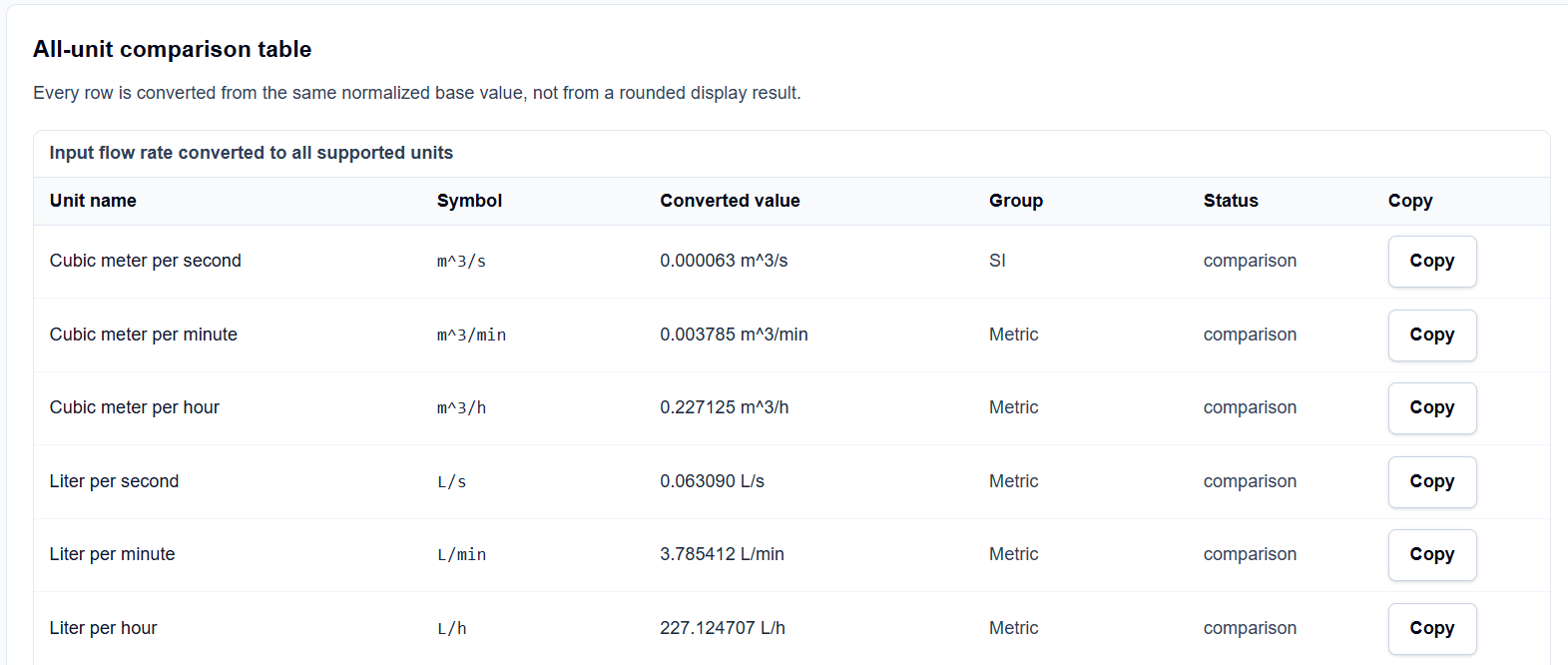
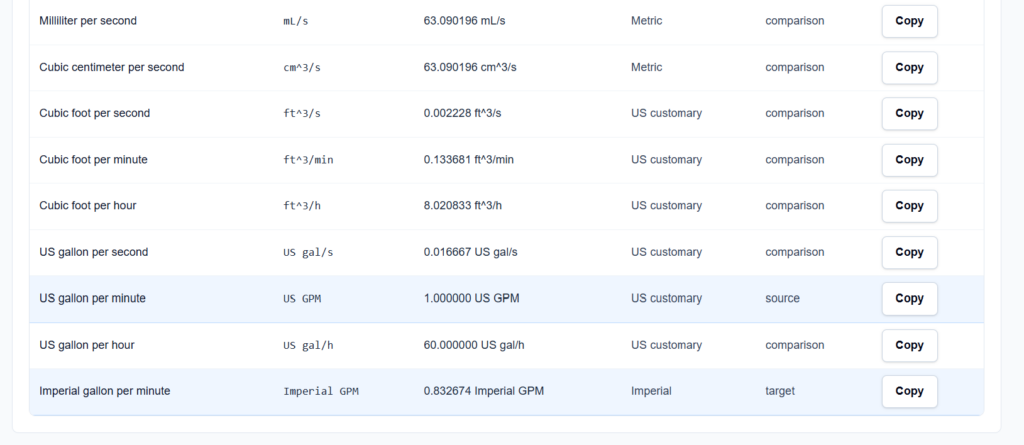
Every row in this table is converted from the same normalized base value ($m^3/s$), not from a rounded display result. If I am converting $L/min$ to US GPM, I can glance at the table to simultaneously see the equivalent in Imperial GPM and $m^3/h$. I also find the Technical visual helpful; it shows a pipe cross-section with volume moving downstream, providing a constant visual reminder that $Q = \text{volume} / \text{time}$.
A Practical Example
Suppose I am verifying a flow requirement of 1 Cubic meter per second ($m^3/s$) for a metric report that requires inputs in Liters per minute. I enter 1 in the value field and select $m^3/s$ as the source and $L/min$ as the target.
When I click calculate, the tool applies the normalization factors and returns exactly 60,000.000000 L/min. I can then look at the comparison table and instantly see that this is also equivalent to approximately 15,850.32 US GPM, allowing me to verify my work against different global standards in a single step.
Mistakes I Would Avoid
One common pitfall I see is using ambiguous GPM units. As noted in the tool’s “Common Mistakes” section, a US gallon is smaller than an Imperial gallon. Using the wrong “GPM” can lead to a 20% error in your flow calculations. I always double-check whether my source data originates from a US or UK/Imperial standard before selecting the unit.
Another mistake is confusing flow rate with velocity. As the engineering disclaimer and interpretation remind us, the converter does not calculate velocity or pressure drop. You still need your $Q = A \times V$ math to determine how fast the fluid is actually moving through a pipe of a specific diameter.
Try the Free Flow Rate Converter
Before you finalize your next pump specification or simulation setup, take a minute to verify your volumetric units. It is the fastest way to eliminate “decimal point drift” in your engineering documentation.
Try the Flow Rate Converter here.
For a complete simulation setup review, you may also find the Density Converter, Dynamic Viscosity Converter, or the Pressure Converter essential for your workflow.
FAQ
1. Is a US Gallon per Minute (GPM) the same as an Imperial GPM?
No. An Imperial gallon is approximately 1.2 times larger than a US gallon. Using the wrong unit can lead to significant errors in pump sizing. The ScholarTool converter provides separate options for both to ensure precision.
2. Why does the tool normalize everything to $m^3/s$ first?
By using the Cubic meter per second as a common internal SI base unit, the tool ensures high precision and prevents the compounding rounding errors that occur when converting directly between two non-base units like CFM and Imperial GPM.
3. Does this tool calculate fluid velocity?
No. This is a volumetric flow rate converter. To find velocity, you would need the cross-sectional area of the pipe ($V = Q / A$). The tool provides an engineering interpretation section to help you distinguish these concepts.