
OpenFOAM fvSolution Helper: Online Dictionary Tool
When I am auditing a simulation that refuses to converge or checking why a transient run is taking an eternity per time step, the “culprit” is almost always hidden within the system/fvSolution dictionary. As noted in the OpenFOAM User Guide, this file is the heart of solver and algorithm control, dictating how linear equations are resolved and how pressure and velocity are coupled. While I could manually edit a tutorial file, I find that a lack of structured guidance often leads to mismatched corrector counts or aggressive relaxation factors that destabilize the entire run.
What I find indispensable for these setup and debugging phases is the OpenFOAM fvSolution Helper from ScholarTool. It is a deterministic, browser-local utility designed to build a conservative baseline for linear solvers, tolerances, and coupling loops. It prioritizes instructional clarity and data residency, ensuring that my case-specific settings and residual targets stay on my machine while I plan my numerical strategy.
What the fvSolution Helper Helps You Do
The primary purpose of this tool is to bridge the gap between abstract algorithm theory (like SIMPLE or PIMPLE) and actionable C++ dictionary syntax. In technical terms, it validates your numeric inputs such as corrector counts and relaxation factors and formats them into the precise sub-dictionary structures required by OpenFOAM.
I find the interface particularly helpful because it forces you to think about the solver distribution you are using. Instead of just giving you a generic block, it allows you to select Distribution guidance for the OpenFOAM Foundation (e.g., v14) or OpenCFD-style (.com) syntax. What I appreciate most is the “browser-only” architecture. Because the tool processes all inputs locally using TypeScript, your proprietary solver names or research parameters are never submitted to a third-party AI or remote analysis API.
Inputs You Can Use
The interface is built with a configuration-first layout to ensure your solution strategy is consistent before the text is generated.
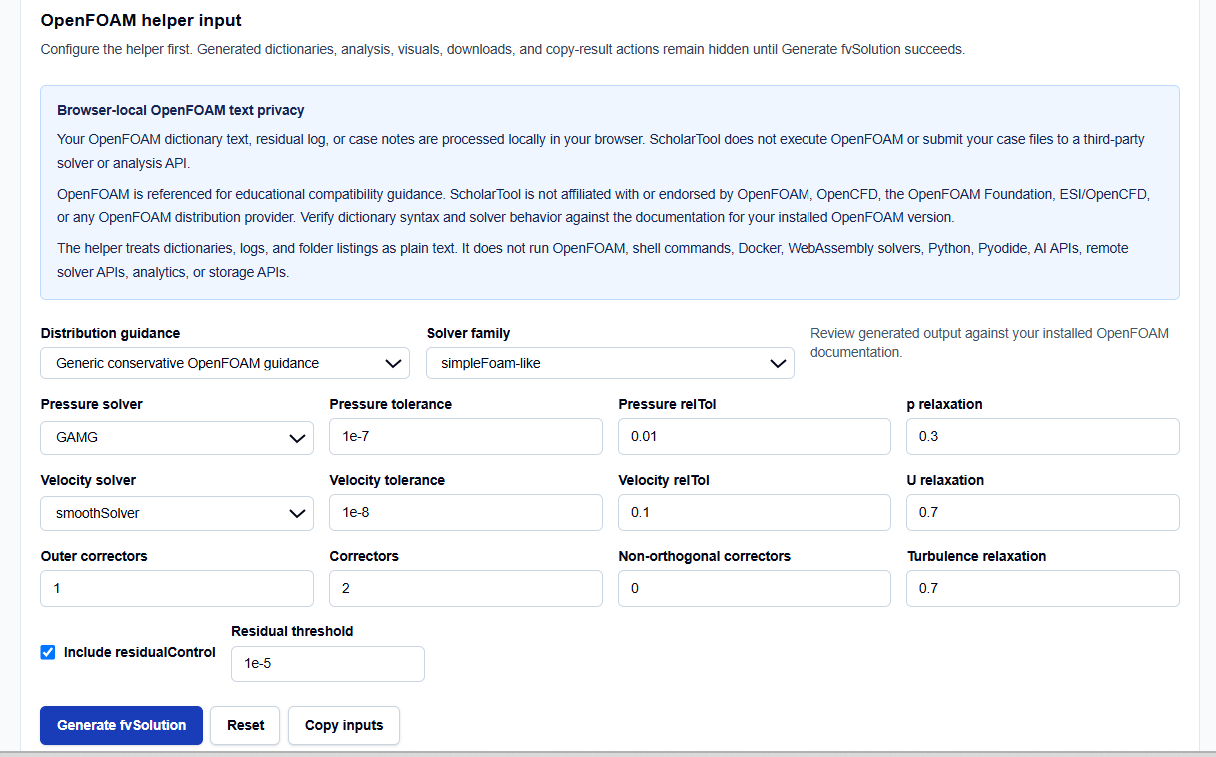
Solver Family and Distribution
I always start by selecting my Solver family, such as simpleFoam-like for steady-state cases or pimpleFoam-like for transient runs. This choice is critical because it determines whether the tool generates a SIMPLE, PISO, or PIMPLE algorithm block. You then select the distribution style to ensure the resulting keywords match your installed version.
Linear Solver Configuration
You can specify distinct solvers for Pressure (e.g., GAMG or PCG) and Velocity (e.g., smoothSolver or PBiCGStab). I find the ability to set both the absolute tolerance and the relative tolerance (relTol) side-by-side very practical. It serves as a professional reminder that relTol is often a dimensionless stopping target that dictates how much the residual must drop within a single linear solve.
Relaxations and Correctors
You have direct control over Relaxation factors for fields like pressure (p) and equations like velocity (U). For transient PIMPLE runs, you can also define Outer correctors, Inner correctors, and Non-orthogonal correctors. This granularity is vital for maintaining boundedness on poor-quality meshes.
How I Use the Tool for Setup Audits
My typical workflow begins when I have a fresh mesh and need to establish a stable numerical baseline. I open the OpenFOAM fvSolution Helper and select my solver family.
Once I have entered my desired tolerances and relaxation factors, I click Generate fvSolution. I find it useful that the results, visuals, and copy-result actions remain hidden until this explicit action succeeds, preventing me from acting on stale data. I then review the Visual summary, which identifies the corrector counts and relaxation levels I’ve planned. If I am troubleshooting an oscillating run, I use the helper to lower the relaxation factors below 1.0 to damp the updates, as the tool’s worked examples suggest.
A Comparative Perspective: SIMPLE vs. PIMPLE
From a professional perspective, selecting the right algorithm block is the most significant choice in fvSolution.
- SIMPLE-like: Used for steady-state runs where you rely on under-relaxation factors (typically 0.3 for pressure and 0.7 for velocity) to reach a stable solution.
- PIMPLE-like: Used for transient simulations where you may need multiple outer correctors per time step to resolve the coupling between pressure and velocity more accurately.
- GAMG vs. PCG: While GAMG is often faster for large pressure matrices, PCG is a reliable alternative for smaller, well-conditioned systems.
Understanding the Results
The result section provides the Editable fvSolution text first, targeted for your system/fvSolution file. For a professional audit, I focus on the secondary outputs:
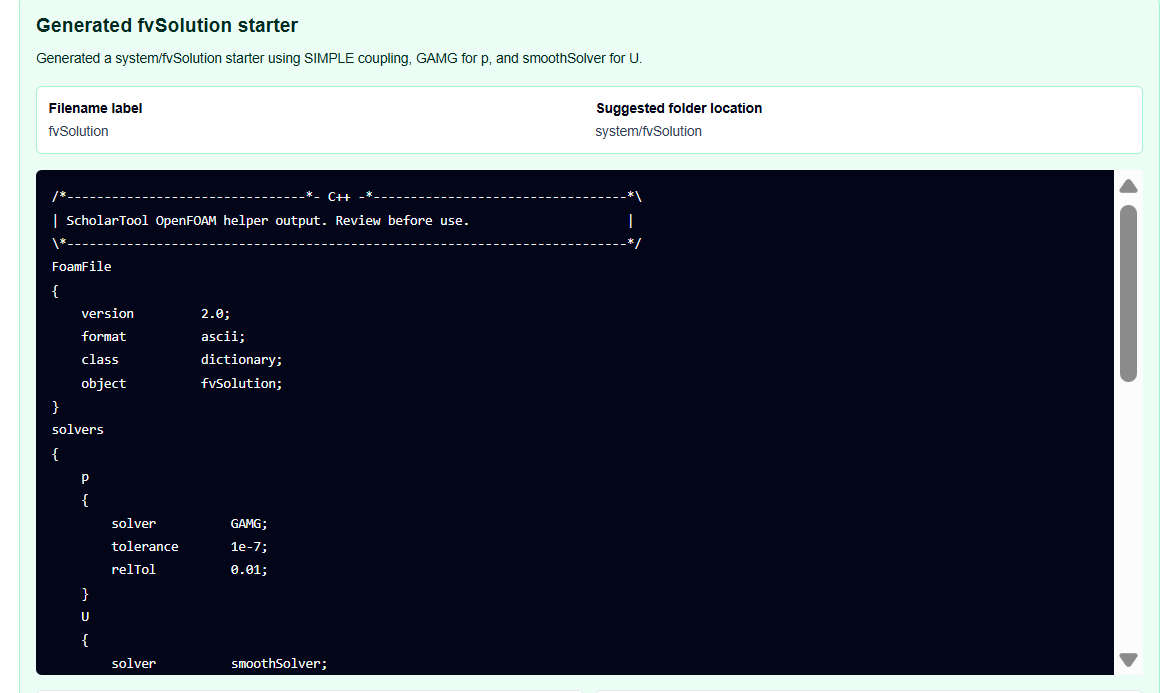
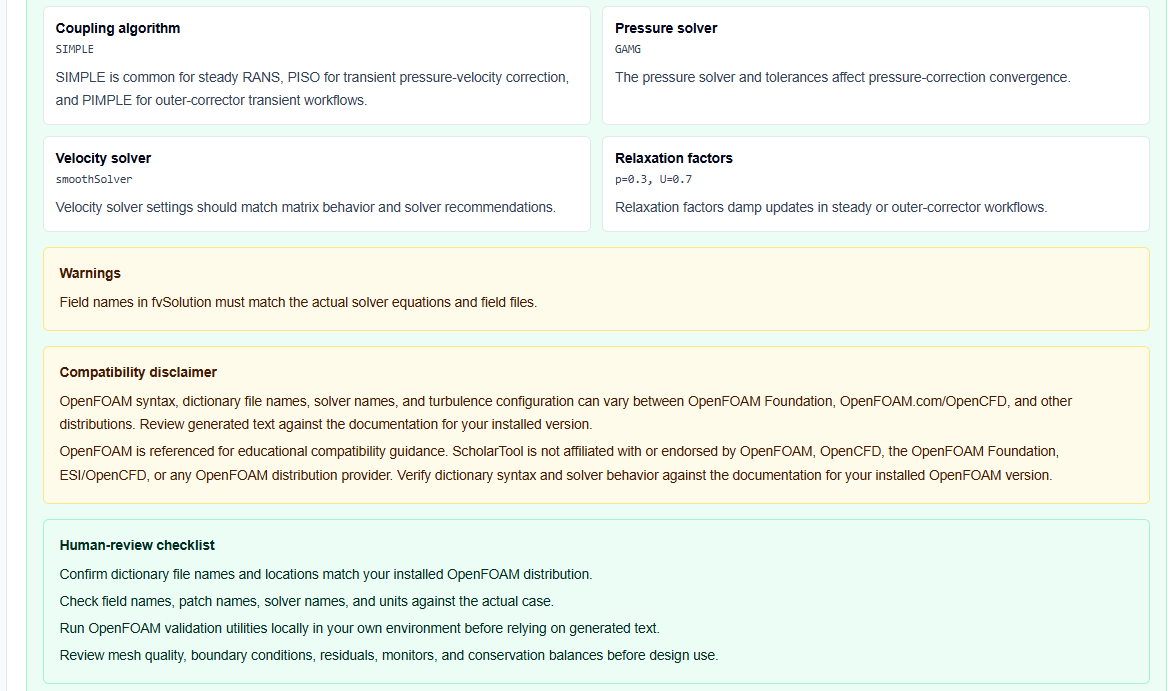
- Human-Review Checklist: Reminds me to verify that my field names (like p and U) match my actual case files.
- Residual Control Reminders: If I select residualControl, the tool adds a stopping target (e.g., 1e-5), which is essential for efficient steady-state runs.
- Warnings: These identify if my solver family choices or field names need further review based on my distribution.
Mistakes I Would Avoid
One common pitfall is using relaxation factors greater than 1. As the tool’s common mistakes section warns, relaxation is meant to damp updates; factors over 1.0 will likely lead to immediate divergence.
Another mistake is setting relTol to zero without understanding the cost. This forces the linear solver to reach the absolute tolerance every single time, which can significantly increase computational time without necessarily improving the physics of the result.
Try the Free OpenFOAM fvSolution Helper
Before you manually type out another complex system/fvSolution, take a minute to generate a transparent solver draft. It is the fastest way to ground your OpenFOAM setup in verified algorithm logic while maintaining total browser privacy.
Try the OpenFOAM fvSolution Helper here.
To complete your pre-processing toolkit, you may also find the OpenFOAM fvSchemes Helper or the OpenFOAM Residual Log Analyzer essential for your simulation workflow.
FAQ
1. Why does my simulation diverge even with these settings?
Relaxation values damp updates but cannot fix incorrect physics, poor mesh quality, or wrong boundary conditions. If residuals oscillate, you should review your boundary conditions and discretization schemes.
2. What is the difference between tolerance and relTol?
tolerance is the absolute residual level at which the linear solver stops. relTol is the ratio by which the initial residual must drop during a single solve.
3. Does this tool run OpenFOAM on a server?
No. All processing happens browser-locally on your device. Your dictionary text and case notes remain in the page state and are never submitted to an external solver or AI API.